Budget
Staff Admin
Budget is where each office, programme and grant plans its money and then tracks it as it's spent. A budget is approved once, then every purchase, trip, payroll run and journal entry is checked against it. Committed and actual amounts flow in automatically from the other apps, and changes during the year are made through recorded transfers and revisions, never by overwriting the numbers.
Module: npo_budget
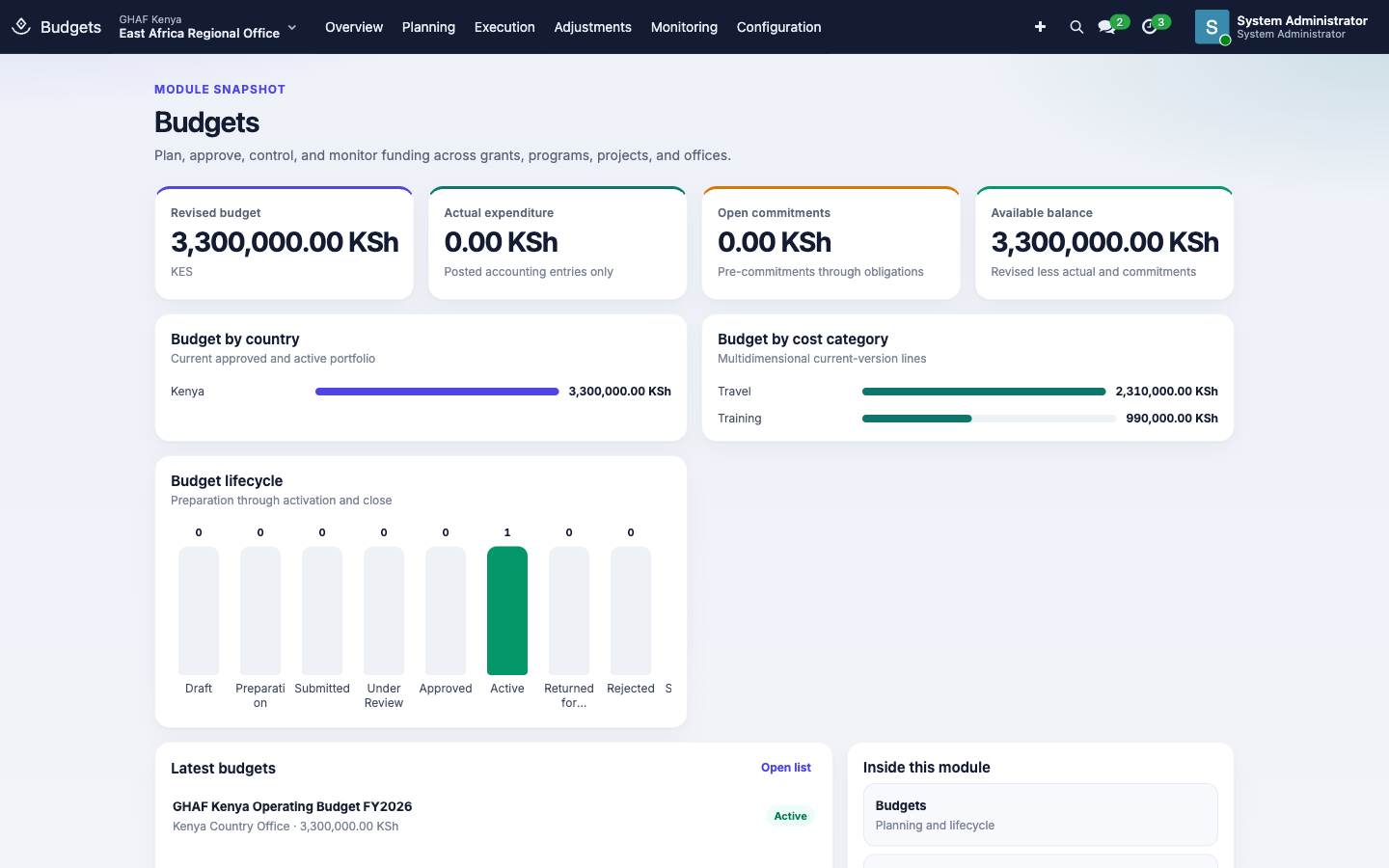
In plain words
- A budget is a plan for a period (usually a fiscal year), made of lines: how much may be spent on what, such as staff travel or community events.
- It's approved through the Approvals app before it can be used.
- When someone raises a purchase or a travel advance, Amana reserves the money on the right line. That's a commitment. When the bill is posted, it becomes actual spending. Available is what's left.
- Control rules decide what happens when a request would go over the line: block it, warn, or ask for an exception approval.
- Moving money between lines (a transfer) or changing totals (a revision) creates a new version of the budget. Every earlier version stays on record for auditors and donors.
Before you start
- A fiscal year with monthly periods exists for the year (Configuration › Fiscal Years).
- Cost categories and budget categories are set up (Configuration).
- Each office has an active Budget approval policy in its currency. Transfers and revisions use it too. See the approval checklist.
- Each budget has a Budget Owner, the person accountable for it.
Who uses it
| Role | What they do | Access level |
|---|---|---|
| Viewer | Follows budgets and spending. | Budgets › Budget Viewer |
| Preparer | Builds budgets and their lines, raises transfers and revisions. | Budgets › Budget Preparer |
| Owner | Is accountable for a budget and its spending. | Budgets › Budget Owner |
| Finance or programme reviewer | Reviews budgets and changes before approval. | Budgets › Finance Reviewer / Program Reviewer |
| Budget manager | Activates, suspends and closes budgets, and manages control rules and fiscal years. | Budgets › Budget Manager |
| Menu | What's there |
|---|---|
| Planning | Budget Cycles, Budgets, Budget Versions, Budget Lines, Sub-Budget Lines, Budget Phasing (month by month) |
| Execution | Commitments, Budget Availability (every check made), Exceptions, Sanction Register |
| Adjustments | Budget Revisions, Budget Transfers, Reforecasts |
| Monitoring | Budget Analysis, Forecasts, Budget Alerts, Alert Log, Budget vs Actual |
| Configuration | Categories, cost categories, funds, funding sources, Control Rules, fiscal years and periods (managers) |
A budget's life
flowchart LR
    D[Draft] -->|Start Preparation| P[Preparation]
    P -->|Submit| S[Submitted]
    S -->|Start Review| R[Under Review]
    R -->|approved in Approvals| A[Approved]
    R -->|returned| RT[Returned for Correction]
    RT -->|Start Preparation| P
    A -->|Activate| X[Active]
    X <-->|Suspend / Resume| SU[Suspended]
X -->|Close| C[Closed]- Create the budget under Planning › Budgets: its office, fiscal year, dates, currency, Budget Owner and, for a grant budget, the Grant / Award, Fund and Project.
- Click Start Preparation and add the Budget Lines: the amount for each cost category. Use Budget Phasing to spread lines across months; Amana can phase a line evenly for you.
- Click Submit. The budget goes to Approvals as a Budget request. Reviewers click Start Review and approve or return it.
- A budget manager clicks Activate. From then on, spending is checked against it.
- At the end, click Close. Any open commitments must be released or converted to actuals first.
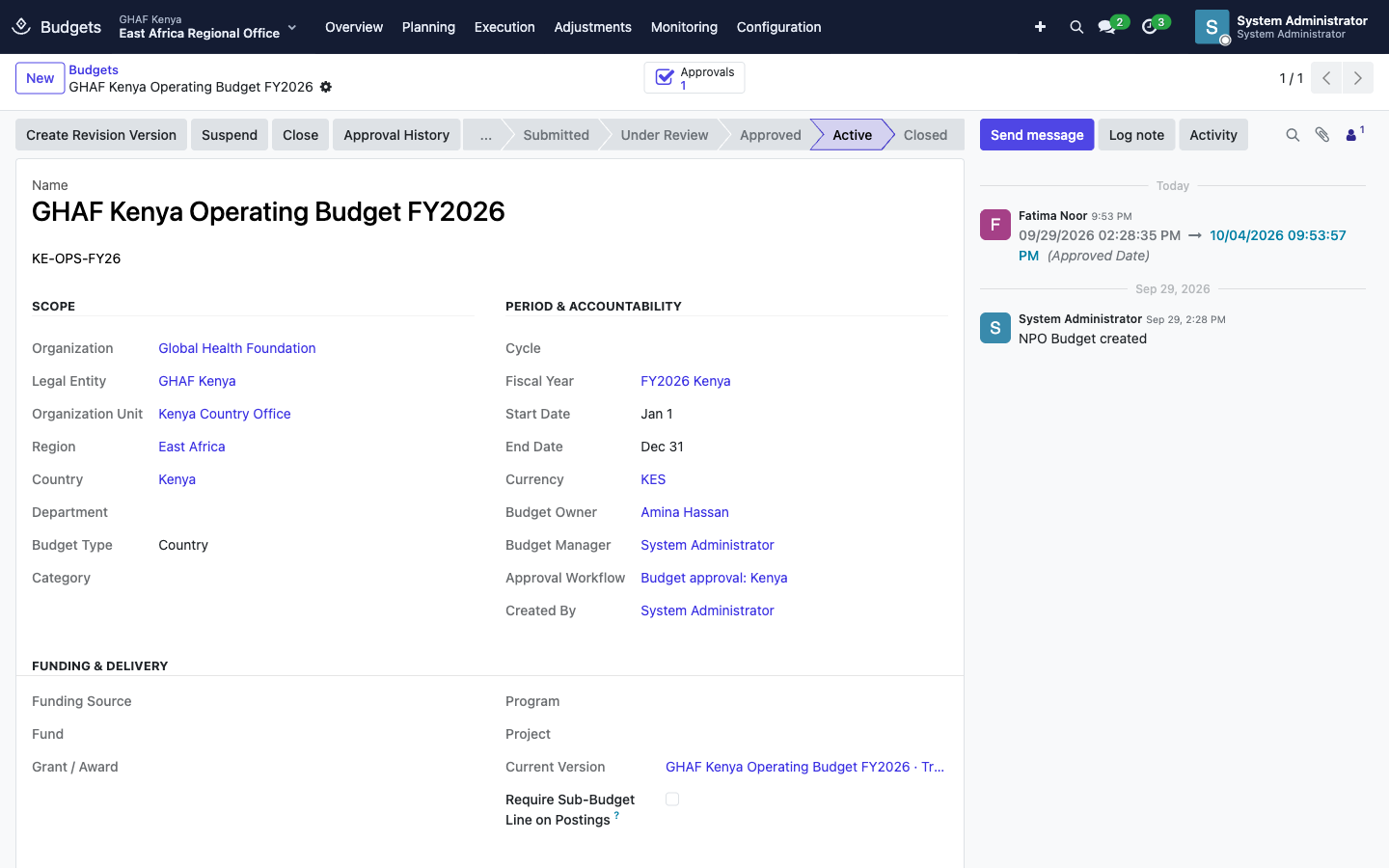
Each budget line shows the whole picture:
- Budget, Original and Revised amounts;
- Committed, Obligated and Actual spending;
- Available, Forecast and Variance.
Actuals come only from posted accounting entries.
Spending against the budget
Money moves through these stages on a budget line:
| Stage | What it means | Typical source |
|---|---|---|
| Pre-Commitment | Money set aside while a request is being approved | A purchase requisition or travel request |
| Commitment | A firm intention to spend | An approved requisition |
| Obligation | A legal promise to pay | A signed purchase order, contract or subaward |
| Converted to Actual | The cost is in the books | A posted vendor bill or journal entry |
| Released | No longer needed, so the money is available again | A cancelled order |
Execution › Commitments lists them, and Budget Availability logs every check Amana made: what was requested, against which line, what was available, and the result.
Control rules
Configuration › Control Rules decides what happens when a request would take a line over its limit:
| Setting | Options |
|---|---|
| Transaction Type | All Transactions, or one of Commitment, Purchase Requisition, Purchase Order, Vendor Bill, Expense, Travel, Payroll, Subaward, Journal Entry |
| Limit Scope | Annual (the line total), Monthly allocation, or both |
| Control Type | Hard Control, Soft Control, Informational, No Control |
| Action | Block, Warn, Require Exception Approval, Allow |
With Require Exception Approval, the person raises a budget exception under Execution › Exceptions. It must be approved before they can submit their request.
Change a budget during the year
Never edit an approved budget directly. Use one of these. Each goes through the same Budget approval, and when approved it creates a new version. The previous version becomes Superseded and stays on record.
| Change | Use | Rules |
|---|---|---|
| Move money between lines, total unchanged | Adjustments › Budget Transfers | The budget must be approved or active. A transfer can't exceed the source line's available balance. Moving more than 10% of a line needs the donor's approval reference. |
| Change the amounts (up or down) | Adjustments › Budget Revisions | Record the justification, and the donor's approval reference when required. |
| Update the forecast only | Adjustments › Reforecasts | Approve, then activate. The new forecast supersedes the old one. |
Example: move savings between lines
- Open Adjustments › Budget Transfers and click New.
- Give it a Name, choose the Budget, and explain the Reason. The Base Version fills in: the version you're changing.
- Add a line: the Source Line, the Destination Line and the Amount. Amana shows the Transfer Percent, and ticks Donor Approval Required when it's above 10%.
- Save and click Submit Transfer.
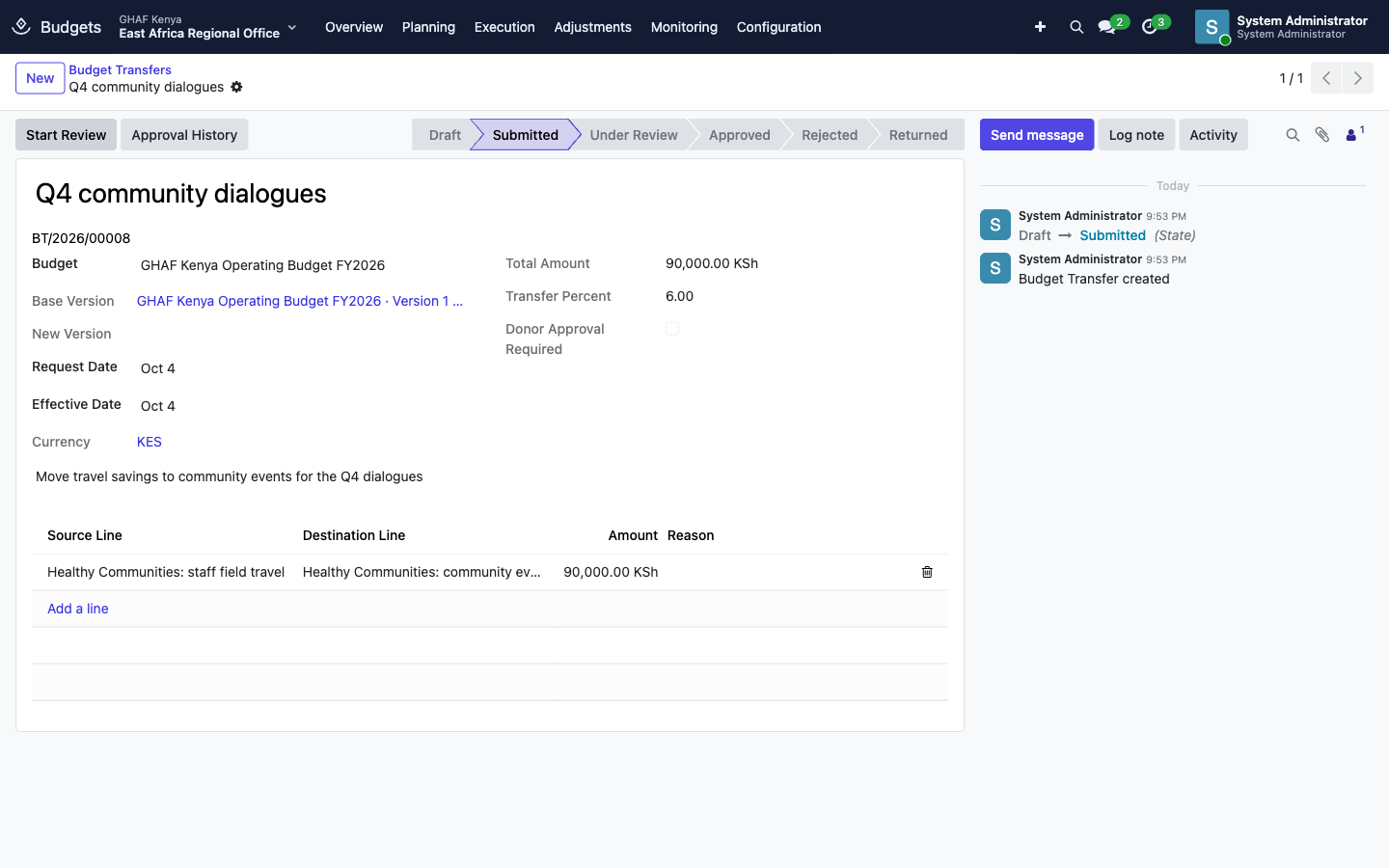
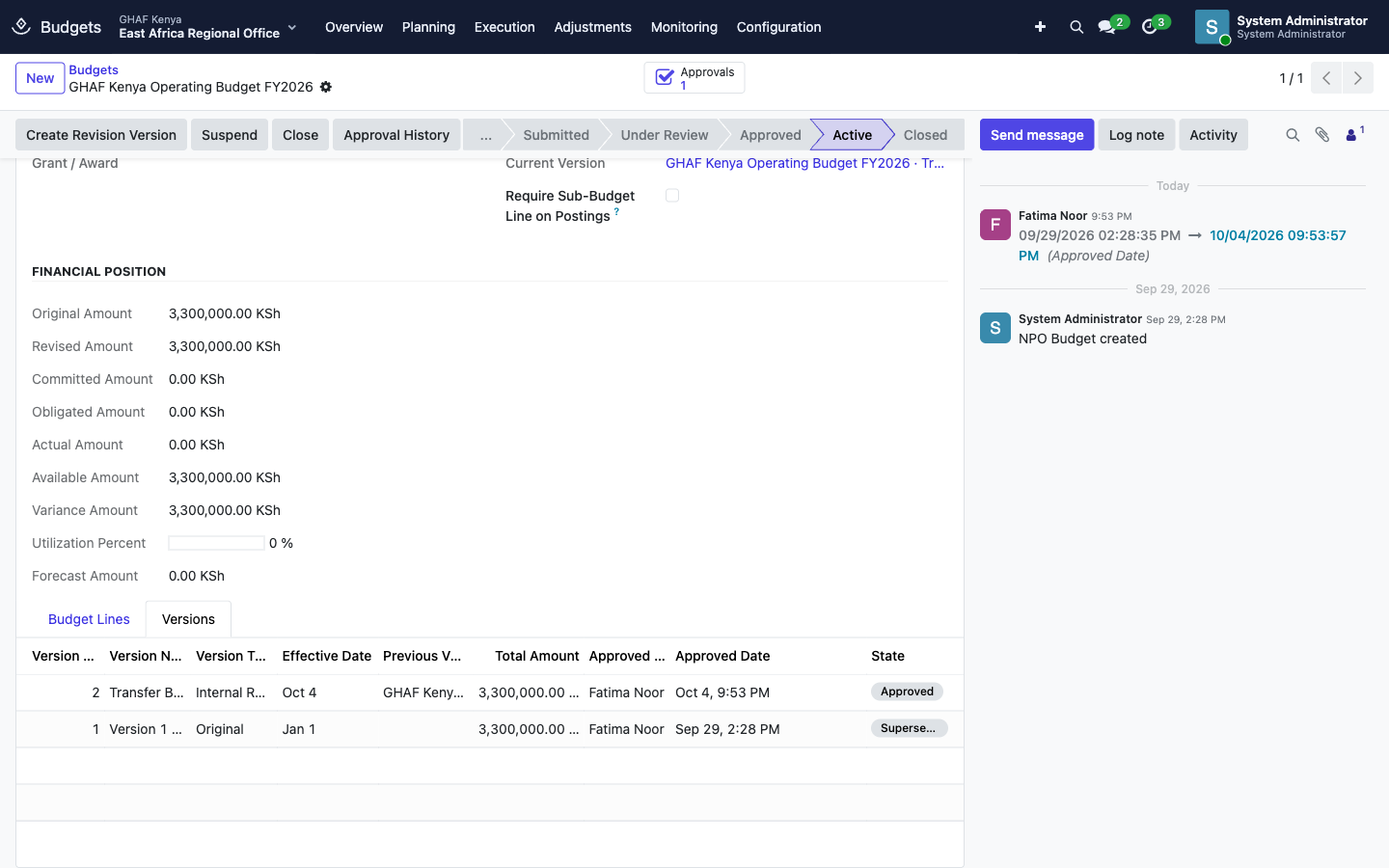
After approval, the budget's Versions tab shows the new current version, with the moved amounts, next to the superseded one.
Monitoring
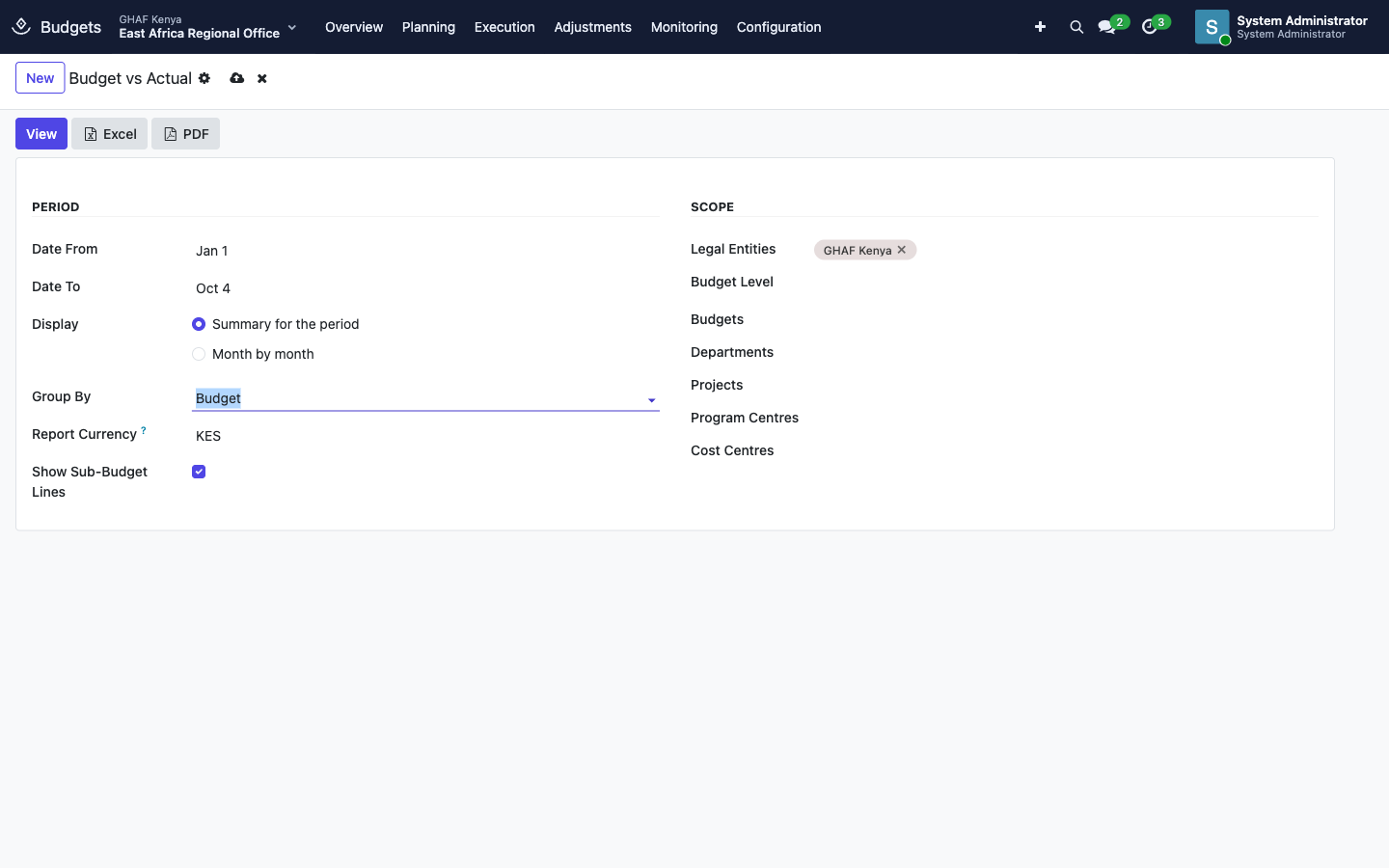
- Budget vs Actual is a report. Choose the Date From and Date To, a Display (summary for the period, or month by month), a Group By, the Report Currency, and the scope (legal entities, budgets, departments, projects, programme or cost centres). Then click View, Excel or PDF. It compares each line's budget with actual and committed spending.
- Budget Analysis and Forecasts show trends and the expected year-end position.
- Budget Alerts watch for thresholds, such as a line passing 80%, and notify the owner. Alert Log keeps every alert raised.
- Financial vs Programme, also under Programs & Projects › Portfolio and in Finance reporting, sets spending against programme progress.
Troubleshooting
\"No active approval policy matches this request.\"
The office has no active Budget policy in this budget's currency. See the approval checklist.
\"A transfer cannot exceed the source line's available balance.\"
Some of the source line is already committed or spent. Check Available on the line, and transfer less, or from another line.
\"Transfers above 10% require a donor approval reference.\"
Get the donor's written approval and enter its reference in Donor Approval Reference before submitting.
\"The budget has changed; recreate this transfer.\"
Another transfer or revision was approved after you started, so the base version is out of date. Create the transfer again.
\"Only approved or active budgets can be transferred.\"
Finish approving the budget first, or use a revision for budgets still in preparation.
\"Release or convert open commitments before closing the budget.\"
Open Execution › Commitments for the budget and release anything no longer needed. Commitments still waiting for a bill will convert to actuals when it's posted.
My request was blocked by budget control.
The line doesn't have enough available, and a control rule blocks it. Ask the budget owner for a transfer, or raise an exception if the rule allows one.