Travel
Staff Admin
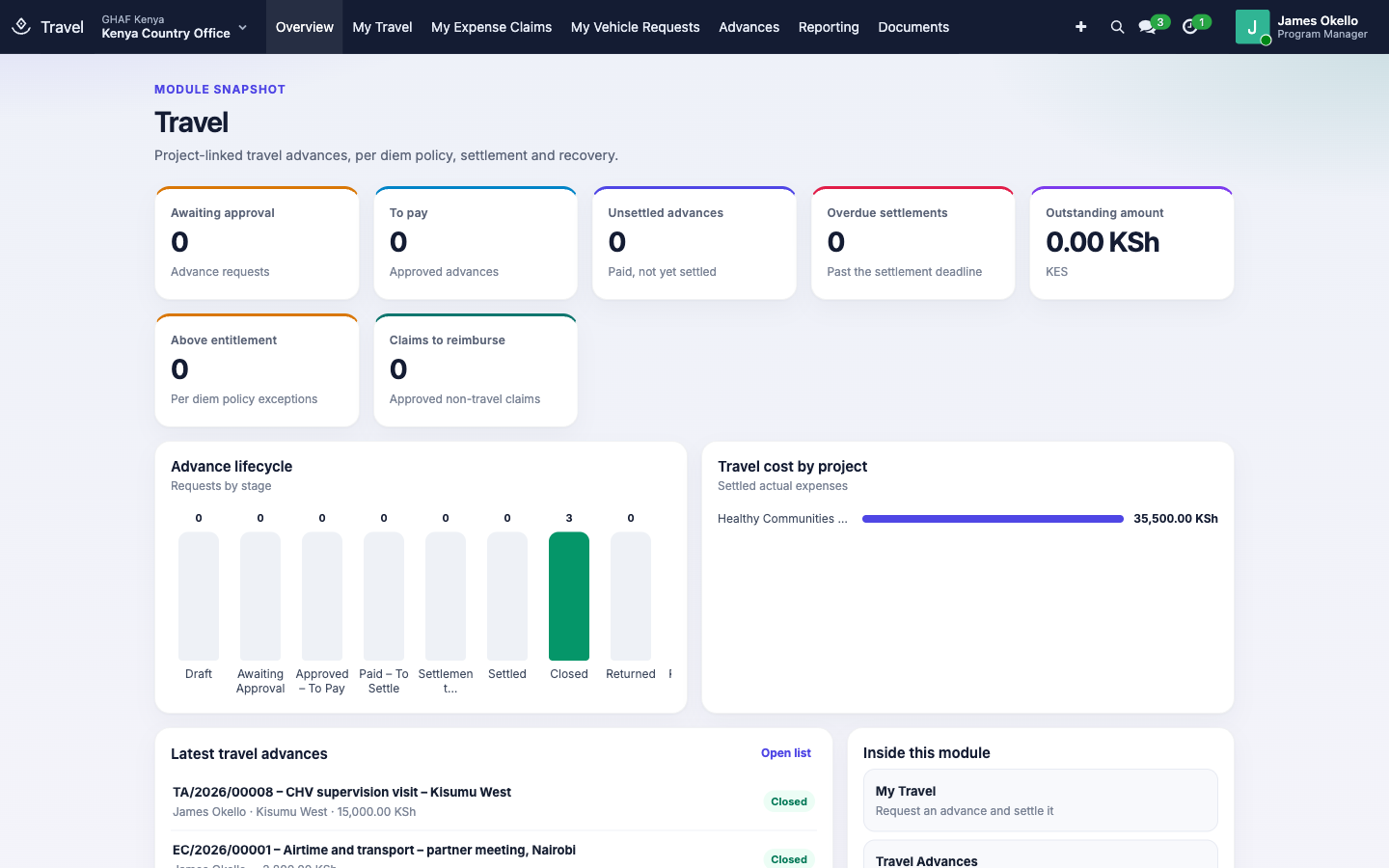
Travel handles staff trips from request to closed books. A traveller asks for an advance charged to a project's budget line. Amana works out their per diem from the organisation's rates and checks the budget, and the trip is approved and paid. After the trip, the traveller accounts for every shilling with receipts and a trip report. Unspent cash comes back, overspending is reimbursed, and each step posts to the right accounts. Staff also use Travel to claim back out-of-pocket costs that aren't trips, such as airtime or a taxi to a meeting.
Module: npo_travel
In plain words
- A travel advance is money paid to a traveller before a trip. It's charged to a budget line, which fixes the project, grant and fund.
- Apply Per Diem Rates fills in the cost estimate from your rates: per diem per day (travel days at a reduced percentage), and accommodation per night. Check Budget & Policy confirms the budget line can carry it and the request is within entitlement.
- Approval follows the office's Travel policy. Then finance pays it, by M-Pesa, bank, card or petty cash.
- After the trip the traveller settles: actual expenses with receipts, and a short trip report, within the deadline (10 days after return by default). The settlement is approved under the office's Travel Settlement policy.
- Spent less than the advance: the traveller refunds the difference. Spent more: they're reimbursed. Once every shilling is accounted for, the advance closes.
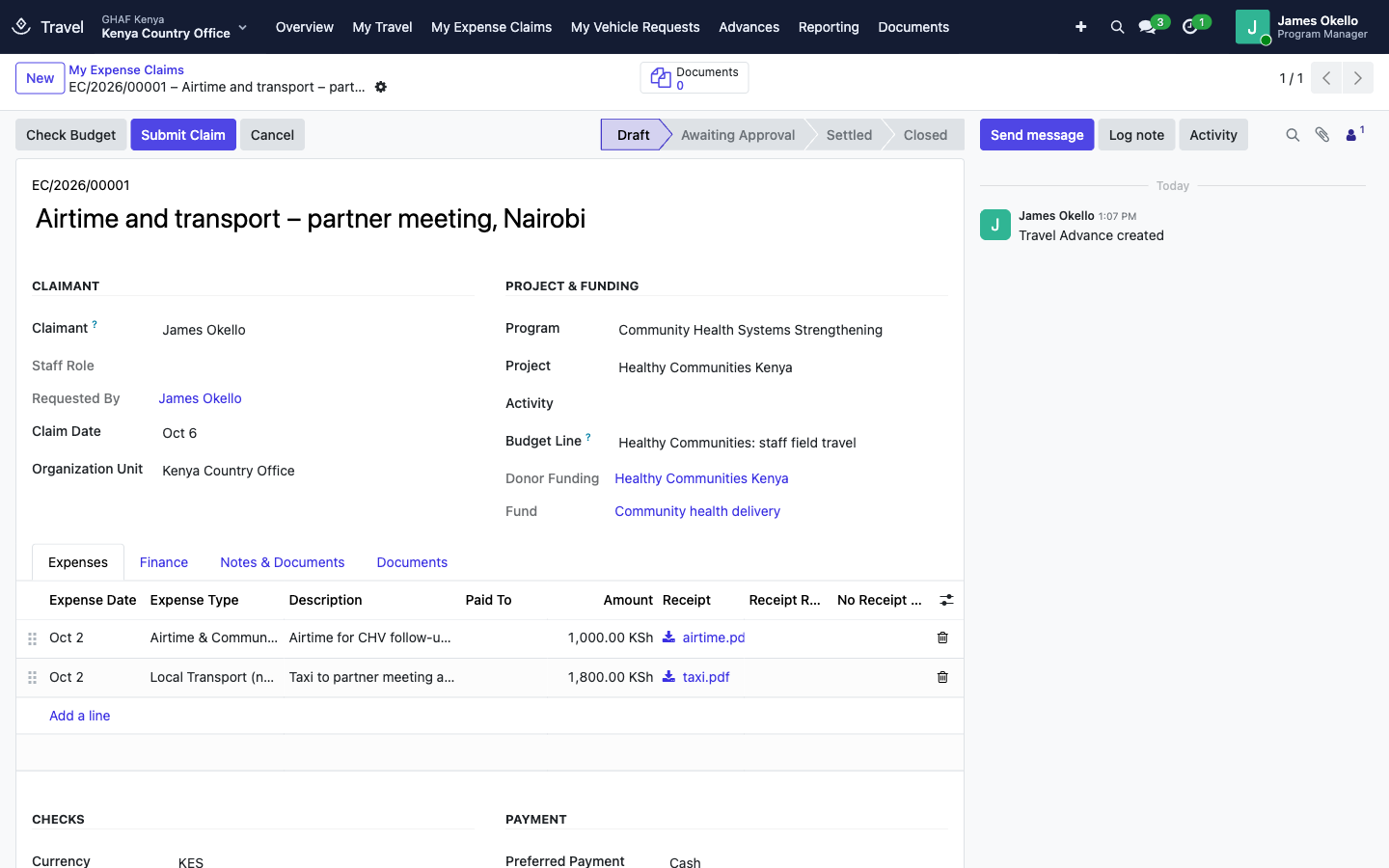
- An expense claim works the same way without an advance: the traveller lists what they paid, with receipts, and is reimbursed once it's approved.
Before you start
- Each office has active Travel and Travel Settlement approval policies in its currency. See the approval checklist. Settlements and expense claims both use Travel Settlement.
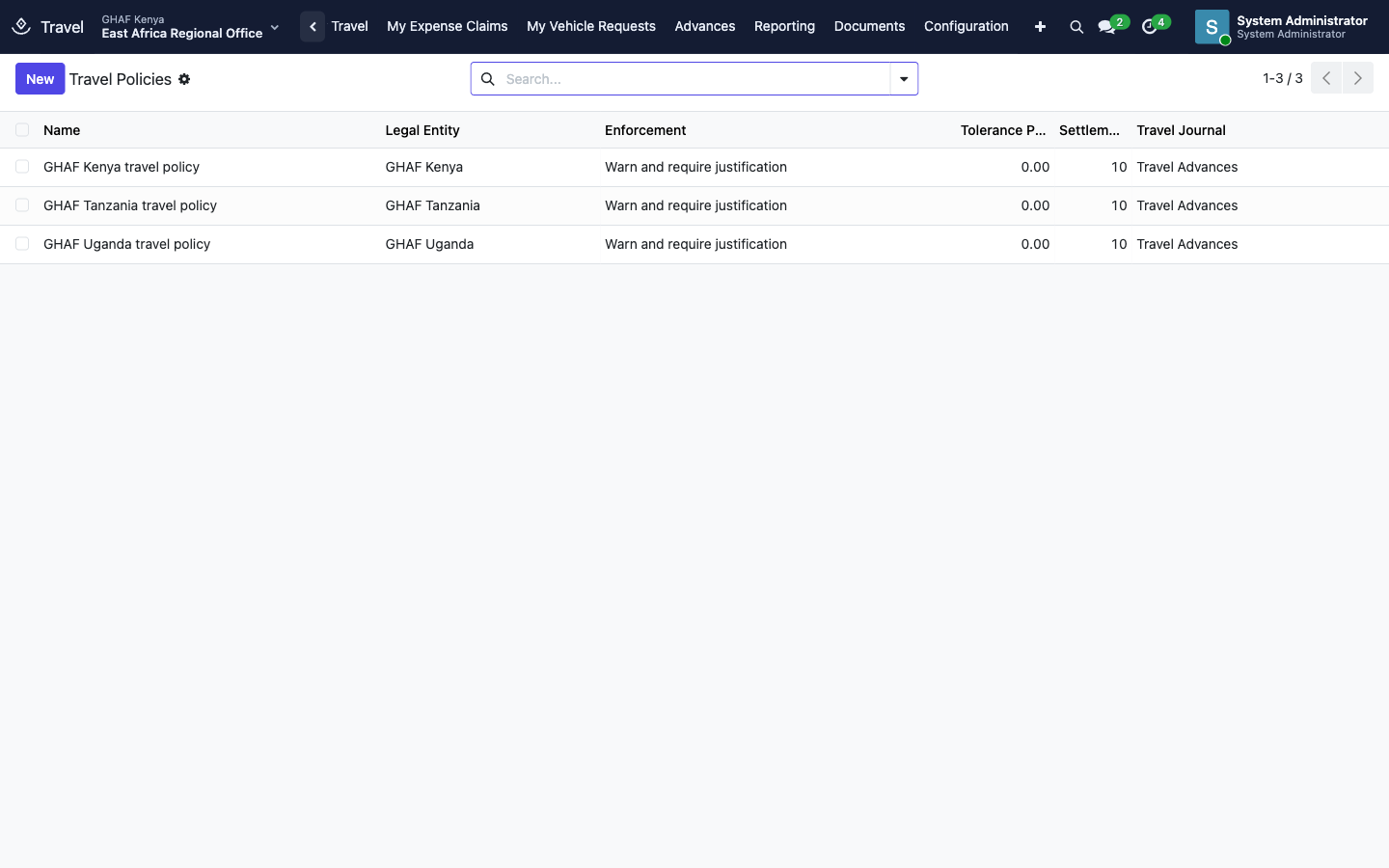
- Each legal entity has a travel policy (Configuration › Travel Policies): its travel journal, staff advances and staff payables accounts, settlement deadline and rules.
- Per diem and travel rates exist for the places staff go (Configuration › Per Diem & Travel Rates).
- Expense types have their expense accounts (Configuration › Expense Types).
- Payment providers are set up for each legal entity (Configuration › Payment Providers). M-Pesa and Paystack need their live credentials before they move real money.
- Every traveller has an employee record, with their mobile money number if they're paid by M-Pesa. Configuration › Create Staff Employee Records creates missing ones for users.
- The project has an active budget line for travel, such as Healthy Communities: staff field travel.
Who uses it
| Role | What they do | Access level |
|---|---|---|
| Traveller (every staff member) | Requests advances, settles them, makes expense claims. | Travel › Traveller |
| Travel officer | Sees and follows up travel in the offices they cover. Country Directors have this. | Travel › Travel Officer |
| Travel finance | Pays advances and reimbursements, records refunds, closes advances. | Travel › Travel Finance |
| Travel administrator | Maintains policies, rates, expense types and payment providers. | Travel › Travel Administrator |
| Approver | Decides requests and settlements in Approvals. | Named in the office's Travel and Travel Settlement policies |
| Menu | What's there |
|---|---|
| Overview | Requests by stage, outstanding and overdue amounts, travel cost by project |
| My Travel, My Expense Claims, My Vehicle Requests | Your own requests. Vehicle requests are covered in Fleet. |
| Advances | Travel Advances, Advances to Pay, Settlements, Expense Claims, Travel Payments (travel staff) |
| Reporting | Outstanding Advances, Overdue Settlements, Project Travel Costs, Policy Compliance |
| Configuration | Travel Policies, Per Diem & Travel Rates, Expense Types, Payment Providers, Approval Workflows, Create Staff Employee Records |
An advance's life
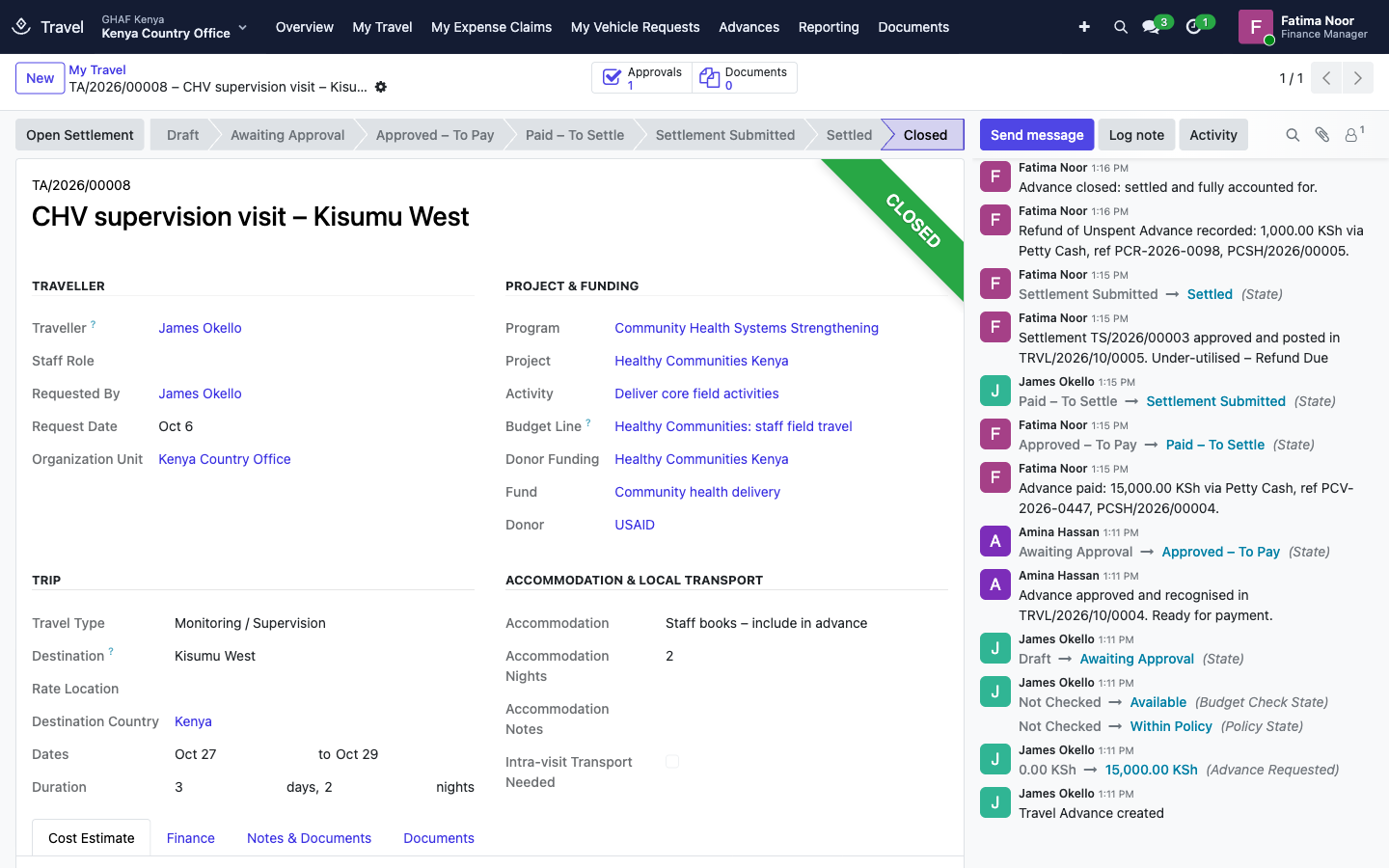
Draft → Awaiting Approval → Approved – To Pay → Paid – To Settle → Settlement Submitted → Settled → Closed
(or Returned for changes, Rejected, Cancelled)
1. Request a travel advance
- Open My Travel and click New.
- Describe the trip's purpose.
- Under Project & Funding, choose the Project, the Activity, and the Budget Line that pays. The grant, fund and donor fill in from the budget line.
- Under Trip, choose the Travel Type (field visit, monitoring, training, meeting…), the Destination, and the departure and return dates. Days and nights are counted for you.
- Under Accommodation & Local Transport, say whether you book the accommodation (it's included in the advance), the organisation books it, or it's provided. Tick Intra-visit Transport Needed if you'll need transport on site.
- Choose your Preferred Payment Method, and your Mobile Money Number for M-Pesa.
- Save, then click Apply Per Diem Rates. The Cost Estimate fills in: per diem (travel days at 50%) and accommodation per night. Add any other costs, such as bus fare.
- Click Check Budget & Policy. The Checks show whether the budget line has the money and whether the request is Within Policy. If it's above entitlement, write the justification.
- Click Submit for Approval.
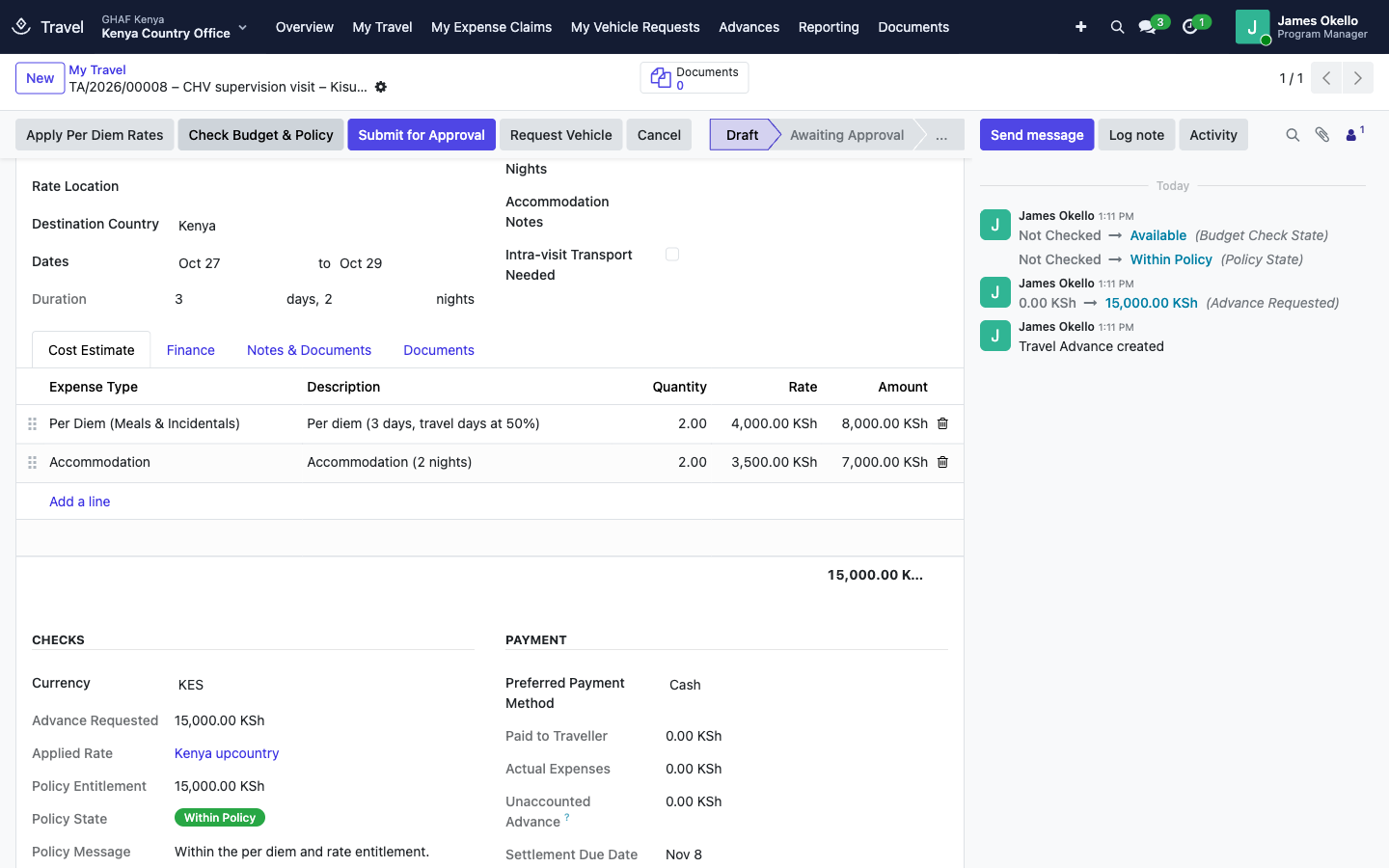
When it's approved, the advance is recognised in the books (staff advance owed to the traveller), and it appears in Advances to Pay.
2. Pay the advance
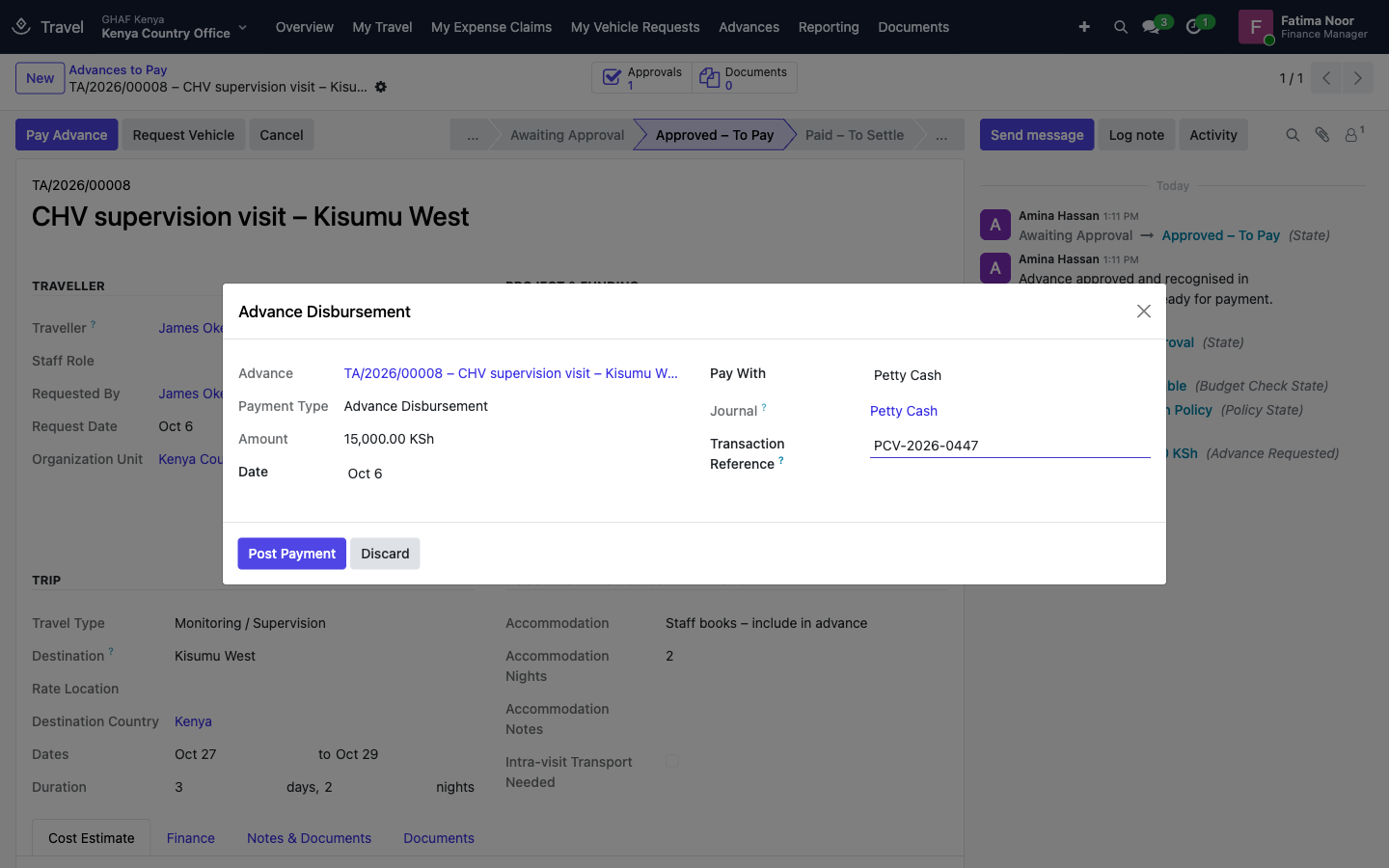
- Open Advances › Advances to Pay and the advance, then click Pay Advance.
- Choose Pay With: M-Pesa or Paystack send the money directly to the traveller's mobile number; for Card, enter the last 4 digits; for Petty Cash, enter the voucher number as the Transaction Reference.
- Click Post Payment. The payment is posted to the provider's journal, and the advance becomes Paid – To Settle with a Settlement Due Date.
3. Settle after the trip
- Open the advance (My Travel) and click Prepare Settlement. The settlement starts from your estimate.
- Enter the Actual Dates.
- On Actual Expenses, record what you really spent: date, expense type, description, who you paid, amount, and the Receipt. If there's no receipt, give the reason in No Receipt Reason. Lines above your policy's receipt threshold must have one or the other.
- On Trip / Activity Report, write what the trip achieved, or attach the report.
- Check Reconciliation with Advance: Variance and Variance State (Fully Utilised, Under-utilised – Refund Due, or Excess Spend – Reimbursement Due).
- Click Submit Settlement.
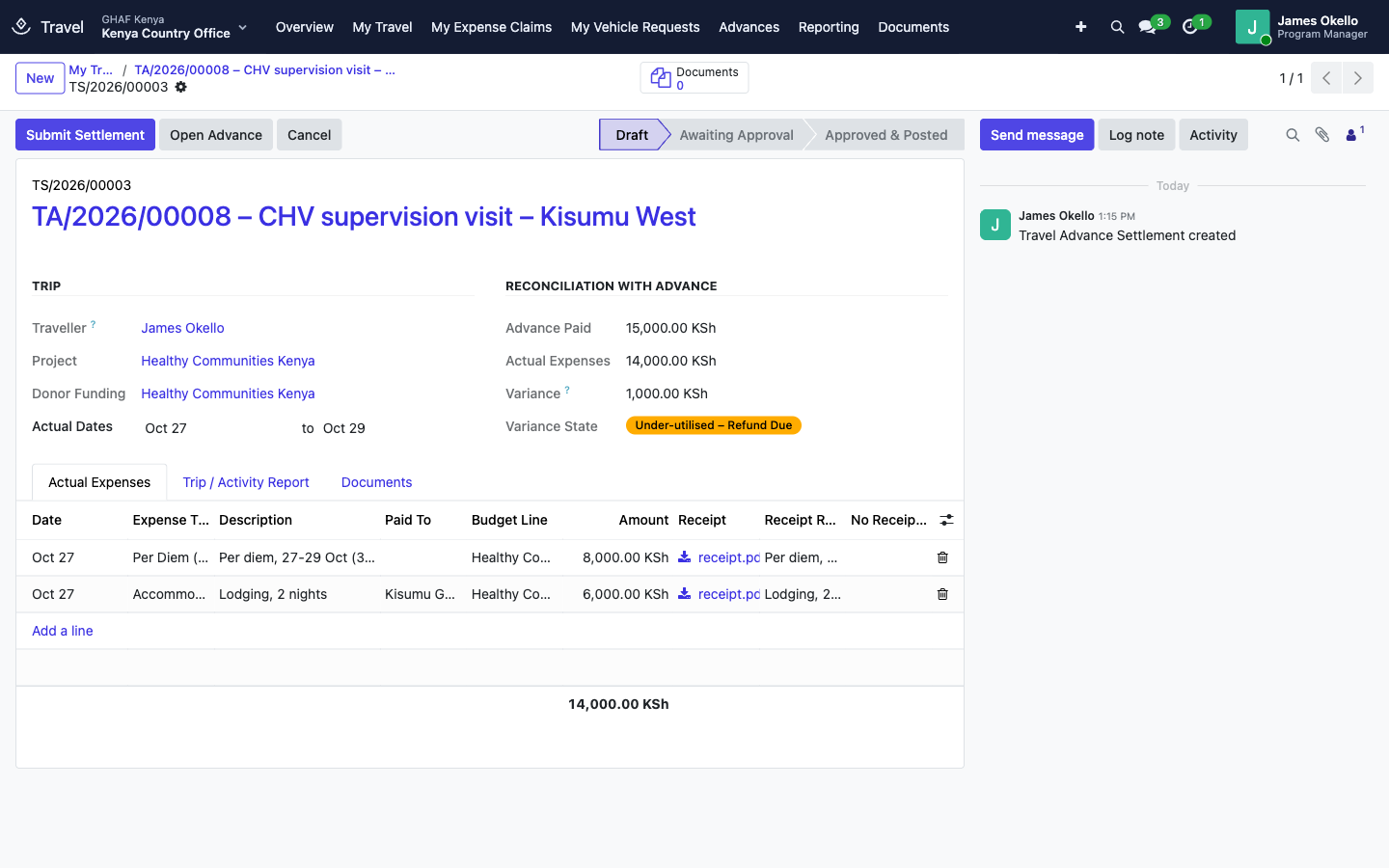
On approval, each expense is charged to its budget line's account, with the project, grant and fund, and the staff advance is cleared.
4. Refund or reimburse, and close
- Refund due: when the traveller returns the cash, finance clicks Record Refund and enters how it came back (M-Pesa, cash, bank) and the reference. Or Recover via Payroll to deduct it from the traveller's next payslip (see Payroll).
- Reimbursement due: finance clicks Pay Reimbursement and pays the difference.
- Once everything is accounted for, the advance closes by itself. Close Advance does the same when nothing is left to pay or recover.
Settle on time
Each advance has a Settlement Due Date. When it passes, the traveller gets a reminder (Travel settlement overdue), the advance shows in Reporting › Overdue Settlements, and, if the policy blocks it, the traveller can't request a new advance until it's settled.
5. Claim back expenses (no trip)
For costs you paid yourself outside a trip, such as airtime for project calls, a taxi to a partner meeting or office supplies:
- Open My Expense Claims and click New.
- Choose the Project and Budget Line that pay.
- On Expenses, add each cost with its date, type, amount and Receipt. A line can be charged to a different budget line if needed.
- Click Check Budget, then Submit Claim. It goes through the office's Travel Settlement policy.
- Once approved, finance opens it from Advances › Expense Claims and clicks Pay Claim. The claim closes when paid.
Reports
- Reporting › Outstanding Advances: paid advances not yet settled, by traveller.
- Reporting › Overdue Settlements: advances past their settlement deadline.
- Reporting › Project Travel Costs: settled travel costs by project, grant and budget line.
- Reporting › Policy Compliance: requests above entitlement and their justifications.
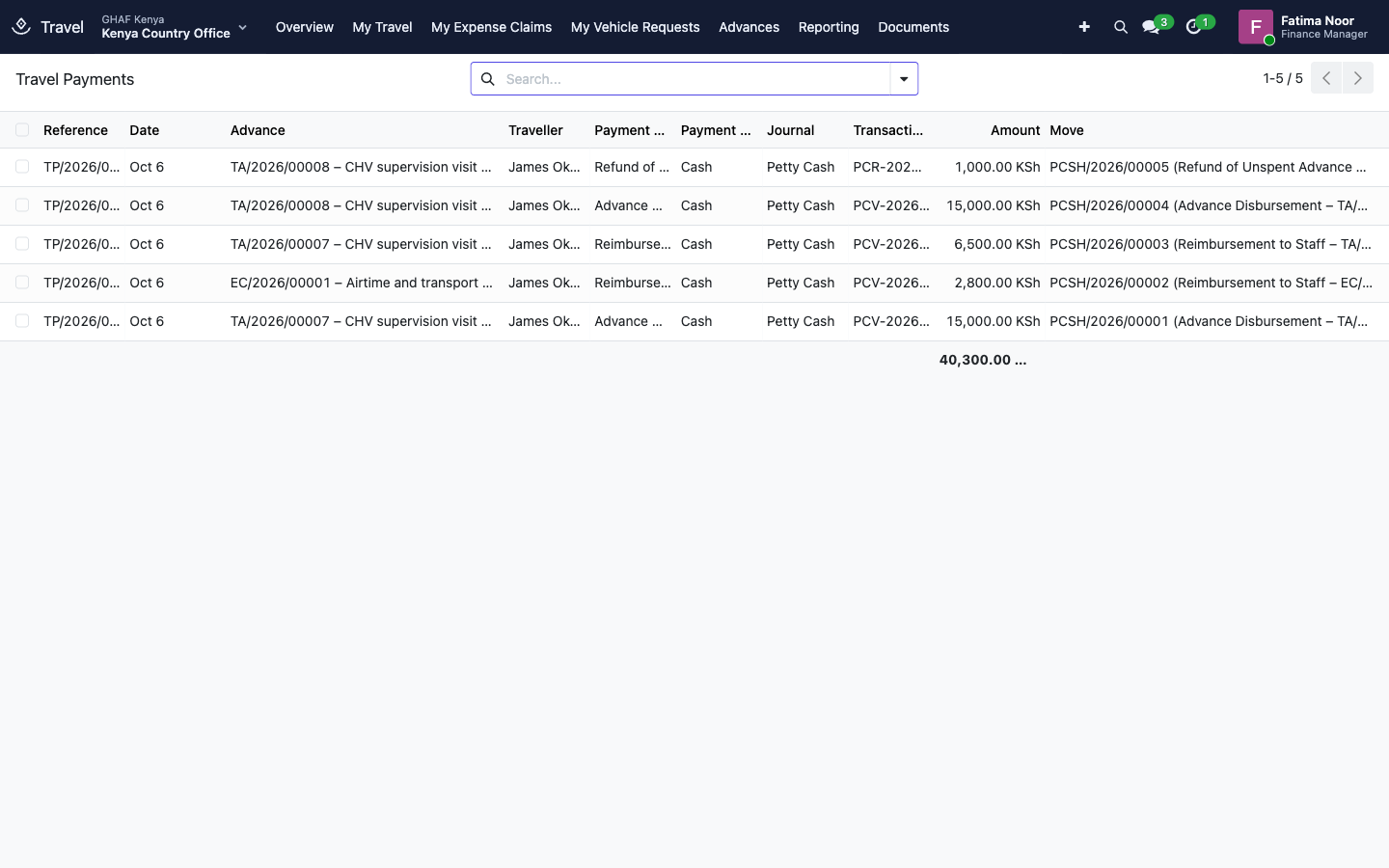
- Advances › Travel Payments: every payment, refund and reimbursement with its reference and journal entry.
Configuration
Configuration › Travel Policies, one per legal entity:
| Setting | What it does |
|---|---|
| Enforcement | Above entitlement: Guide only, Warn and require justification, or Block above entitlement. |
| Tolerance (%) | How far above entitlement a request can go before the enforcement applies. |
| Settlement Due (days) | Days after return by which the settlement is due (10 by default). |
| Block New Advances While Overdue | Staff with an overdue settlement can't request another advance. |
| Receipt Threshold | Expense lines above this amount need a receipt (or a reason). |
| Require Trip Report | A trip or activity report is required at settlement. |
| Travel Journal, Staff Advances and Staff Payables accounts | Where advances, payments and settlements post. |
Configuration › Per Diem & Travel Rates: for each country (and optionally destination and staff role), the Daily Per Diem, Nightly Accommodation, Daily Intra-visit Transport, and the Travel Day % paid on departure and return days.
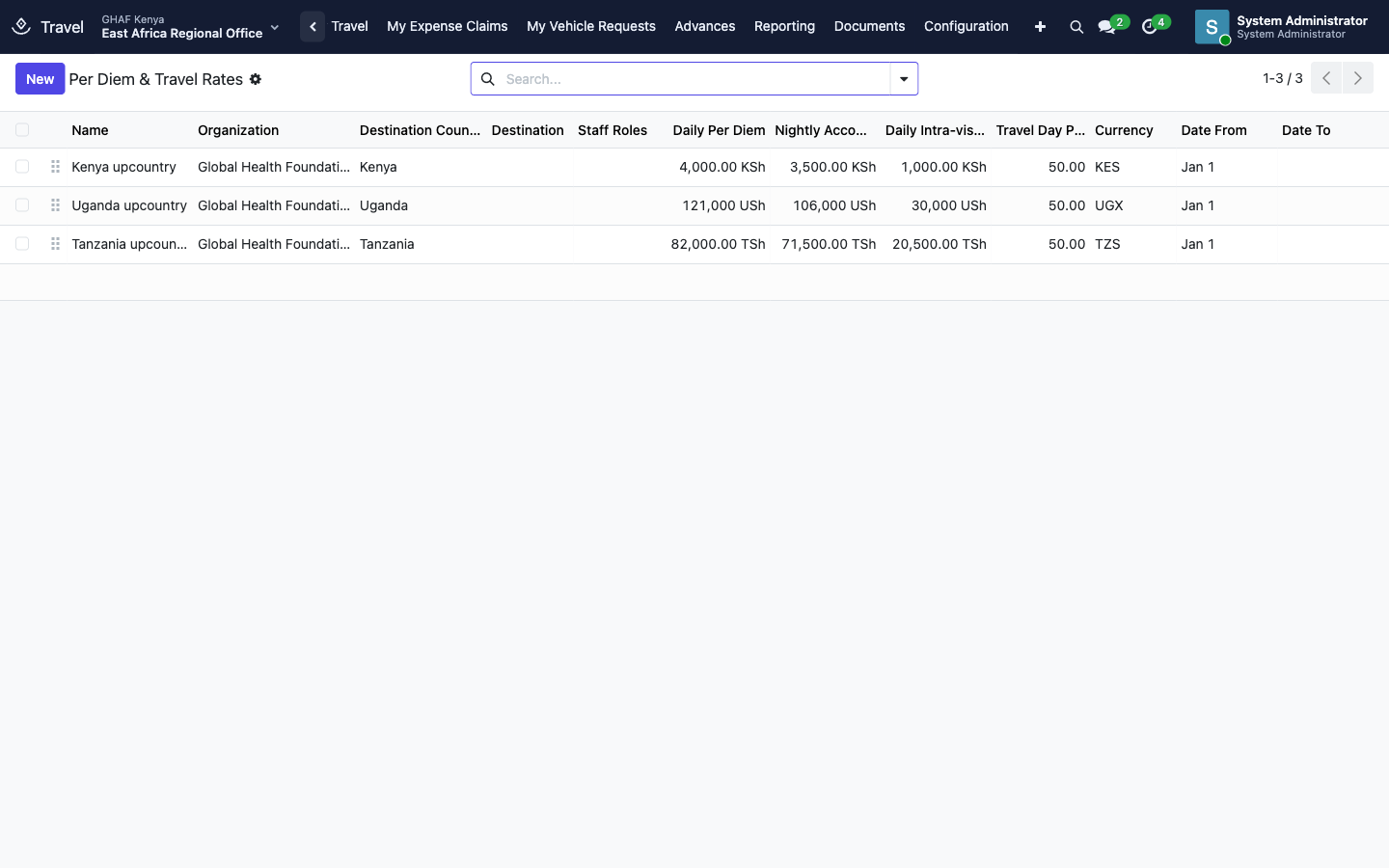
Configuration › Expense Types: per diem, accommodation, transport, airtime, supplies and so on, each with its expense account and whether it needs a receipt.
Troubleshooting
\"No per diem rate is configured for …. Enter the estimate manually.\"
There's no rate for this country or destination. Enter the cost lines yourself, or ask the travel administrator to add a rate.
\"Budget control blocks this request: …\" / \"This request needs an approved budget exception before submission.\"
The budget line doesn't have enough available. Choose another line, or ask the budget owner for a transfer or an exception.
\"… The travel policy does not allow requests above entitlement.\" / \"… Give a justification before submitting.\"
The estimate is above your per diem and rate entitlement. Reduce it, or write the justification if your policy allows it.
\"… has an advance past its settlement deadline (…). Settle it before requesting another.\"
Settle the overdue advance first.
\"Enter the mobile money number the advance is paid to.\"
Add your Mobile Money Number on the request, or choose another payment method.
\"Attach a receipt, or explain why there is none, for: ….\"
Attach the receipt to each listed expense, or write the No Receipt Reason.
\"The travel policy requires a trip or activity report. Write it or attach it.\"
Complete the Trip / Activity Report tab before submitting the settlement.
\"… cannot be closed: … is still owed to the traveller.\"
Pay the reimbursement first (Pay Reimbursement). The advance then closes by itself.
\"A paid advance cannot be cancelled. Settle it or record the refund.\"
Once money has been paid out, the advance has to be settled and anything unspent refunded. If the trip didn't happen at all, talk to finance about returning the advance.