Subawards
Staff Admin
Subawards is where part of a grant is passed on to an implementing partner. It covers the whole chain: a call for proposals, scoring the applications, assessing the chosen partner, the subaward agreement, advances and payments, the partner's financial reports, and compliance (conditions, monitoring visits, capacity building and assets) through to closeout. Money moves through the books at each step, so the prime award always shows what's been obligated, paid and accounted for.
Module: npo_subaward
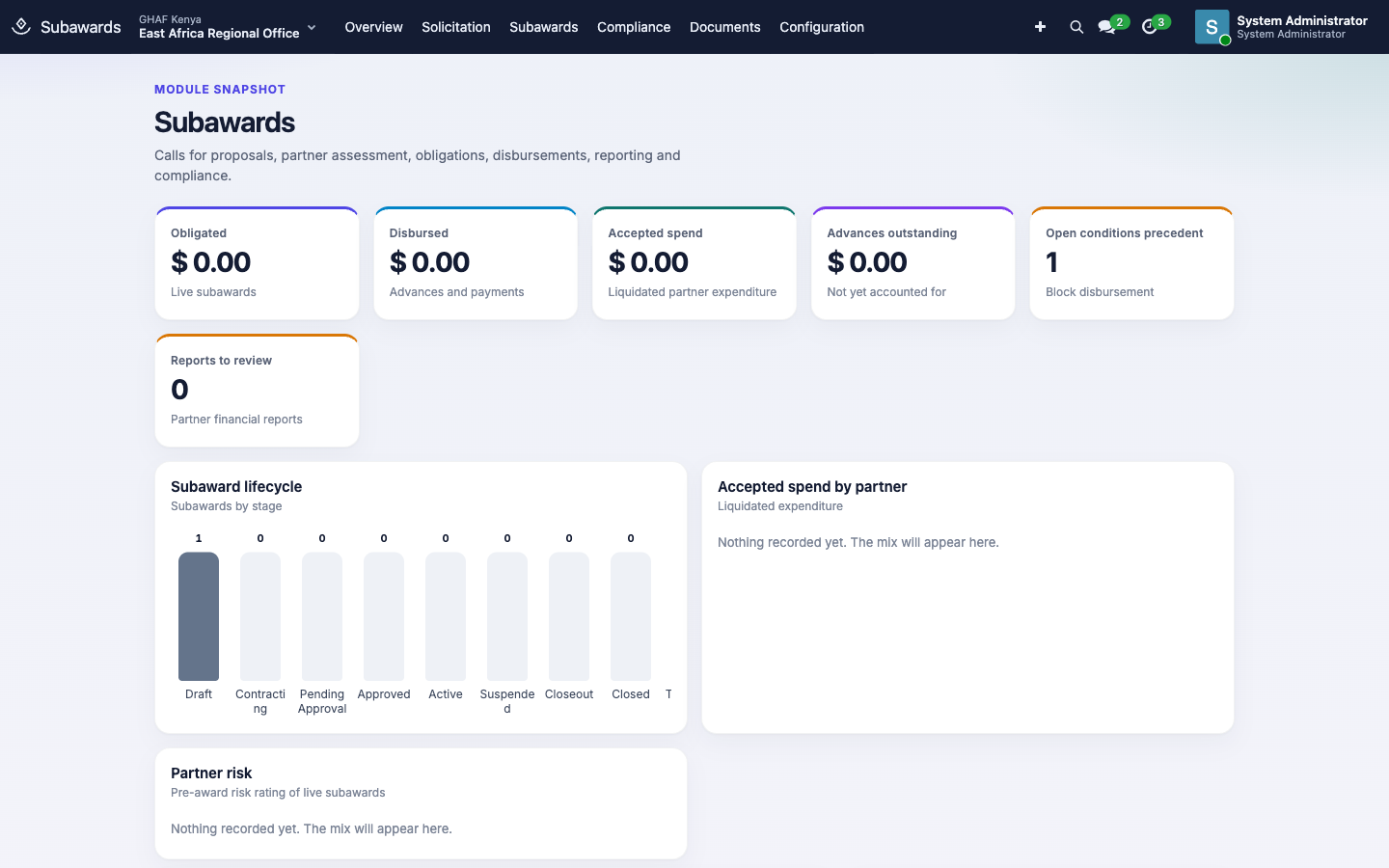
In plain words
- A subaward passes part of a grant to a partner organisation that does some of the work.
- Before any money moves, the partner is chosen fairly (a call for proposals and scoring) and checked (a pre-award assessment). Conditions such as a signed agreement must be met before the first advance.
- The money is tracked in the books: obligated when the subaward starts, paid as advances, and cleared when the partner's financial reports are accepted.
- Key steps always need two different people.
Before you start
- The prime award is Active in Grants.
- The office has an active Grant approval policy in the subaward's currency. Subaward approval uses the same request type as grants. See the approval checklist.
- The assessment areas you score partners on are set (Configuration › Assessment Areas).
- At least two people can work on subawards: an assessor, and a Subawards › Manager who approves the assessment.
Who uses it
| Role | What they do | Access level |
|---|---|---|
| Viewer | Follows subawards, for example country directors. | Subawards › Viewer |
| Subaward officer | Runs calls, scores applications, prepares subawards, disbursements and reviews. Programme managers have this by default. | Subawards › Officer |
| Subaward manager | Approves pre-award assessments, and manages assessment areas under Configuration. | Subawards › Manager |
Several steps need two different people:
- the assessor can't approve their own assessment;
- whoever prepares a disbursement can't approve it;
- whoever submits a partner report can't approve it.
| Menu | What's there |
|---|---|
| Solicitation | Calls for Proposals, Applications, Pre-award Assessments |
| Subawards | Subawards, Disbursements, Partner Financial Reports |
| Compliance | Conditions, Monitoring Visits, Capacity Building, Partner Assets |
| Configuration | Assessment Areas (managers) |
1. Find a partner
Publish a call for proposals
- Open Solicitation › Calls for Proposals and click New.
- Enter the Name, the Prime Award it's funded from, and the Closing Date. Optionally add the Project, Funding Available and Maximum per Partner.
- Write the Advert and Eligibility on their tabs.
- On Evaluation Criteria, add each criterion with a Weight, for example Technical approach 40, Organisational capacity 30, Value for money 30.
- Save and click Publish Call. The call needs criteria, and a closing date that hasn't passed.
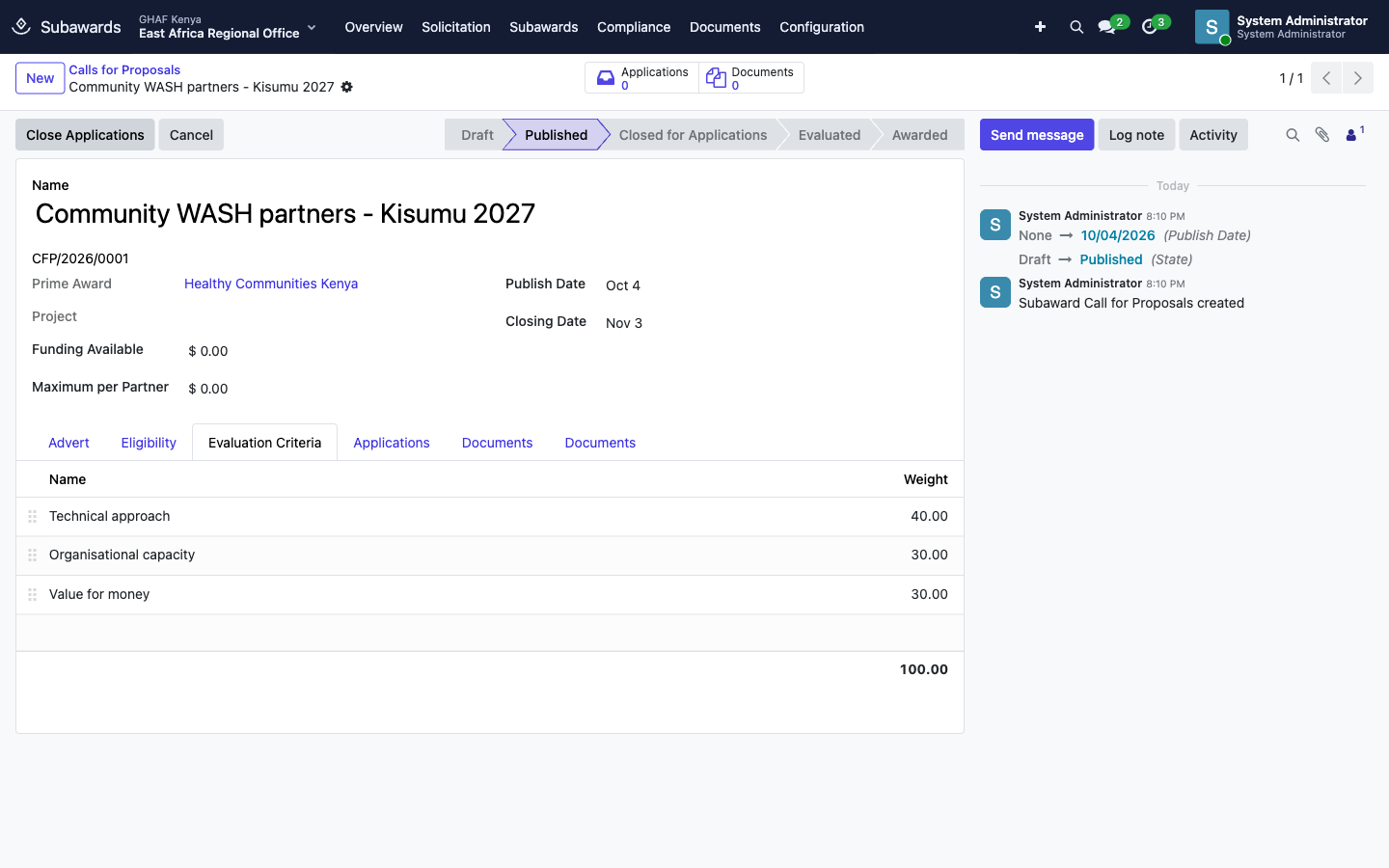
When the deadline passes, click Close Applications. Once every application is scored or rejected, click Evaluation Complete.
Score applications and select the partner
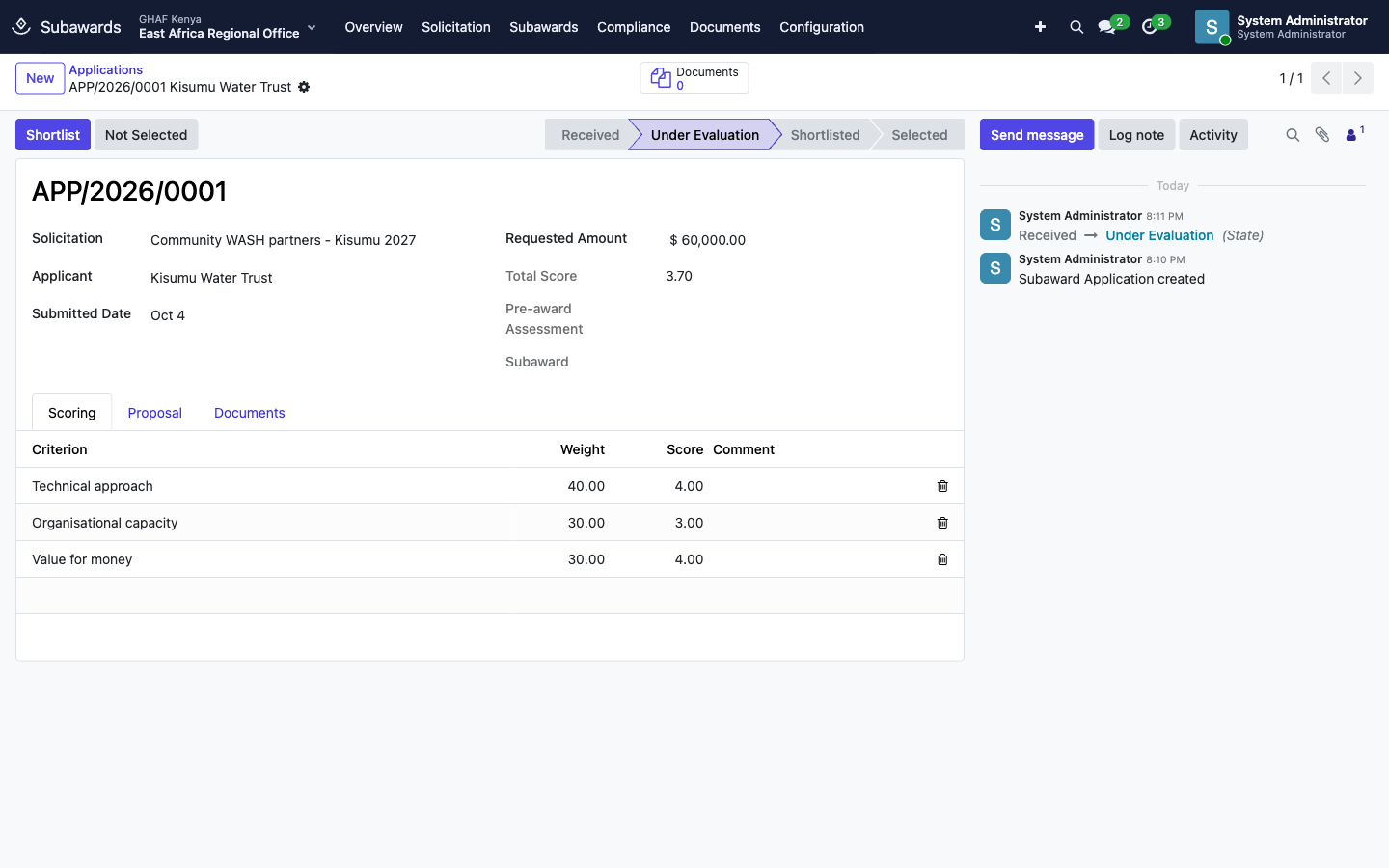
- Open the application under Solicitation › Applications, or from the call's Applications tab.
- Click Start Evaluation. A scoring line appears for each criterion.
- On Scoring, give each criterion a Score and a comment. The Total Score is weighted by the criteria.
- Click Shortlist. The application must be scored first. Use Not Selected for applications that won't go ahead.
- Click Select & Assess Partner. Amana creates a pre-award assessment for this partner.
Assess the partner (pre-award assessment)
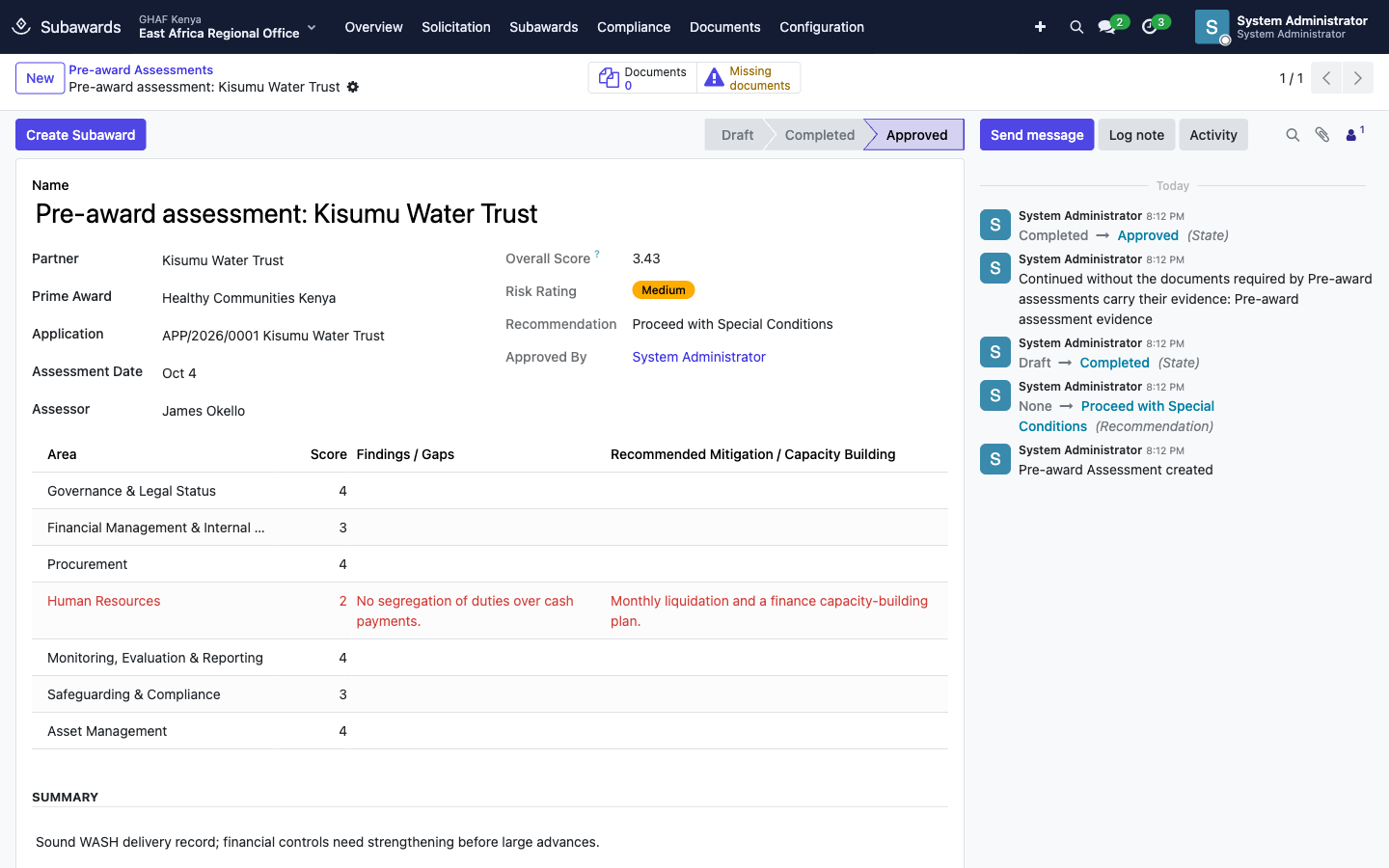
- The assessor scores each Area, from 1 (weak) to 5 (strong): governance, financial management, procurement, HR, monitoring and reporting, safeguarding, and assets. For each, record Findings / Gaps and Recommended Mitigation.
- Amana works out the Overall Score and Risk Rating.
- Choose a Recommendation:
- Proceed.
- Proceed with Special Conditions: needs at least one area scored 2 or less.
- Do Not Proceed.
- Attach the evidence on the Documents tab, then click Complete Assessment.
- A subaward manager who isn't the assessor clicks Approve.
- Click Create Subaward. This isn't possible when the recommendation is Do Not Proceed.
Conditions are created for you
A new subaward always gets a condition precedent: Signed subaward agreement and bank account details on file. With Proceed with Special Conditions, each weak area also becomes a special condition using its mitigation text. Advances and payments are blocked until every condition precedent is met.
2. Agree and activate the subaward
The subaward goes Draft → Contracting → Pending Approval → Approved → Active.
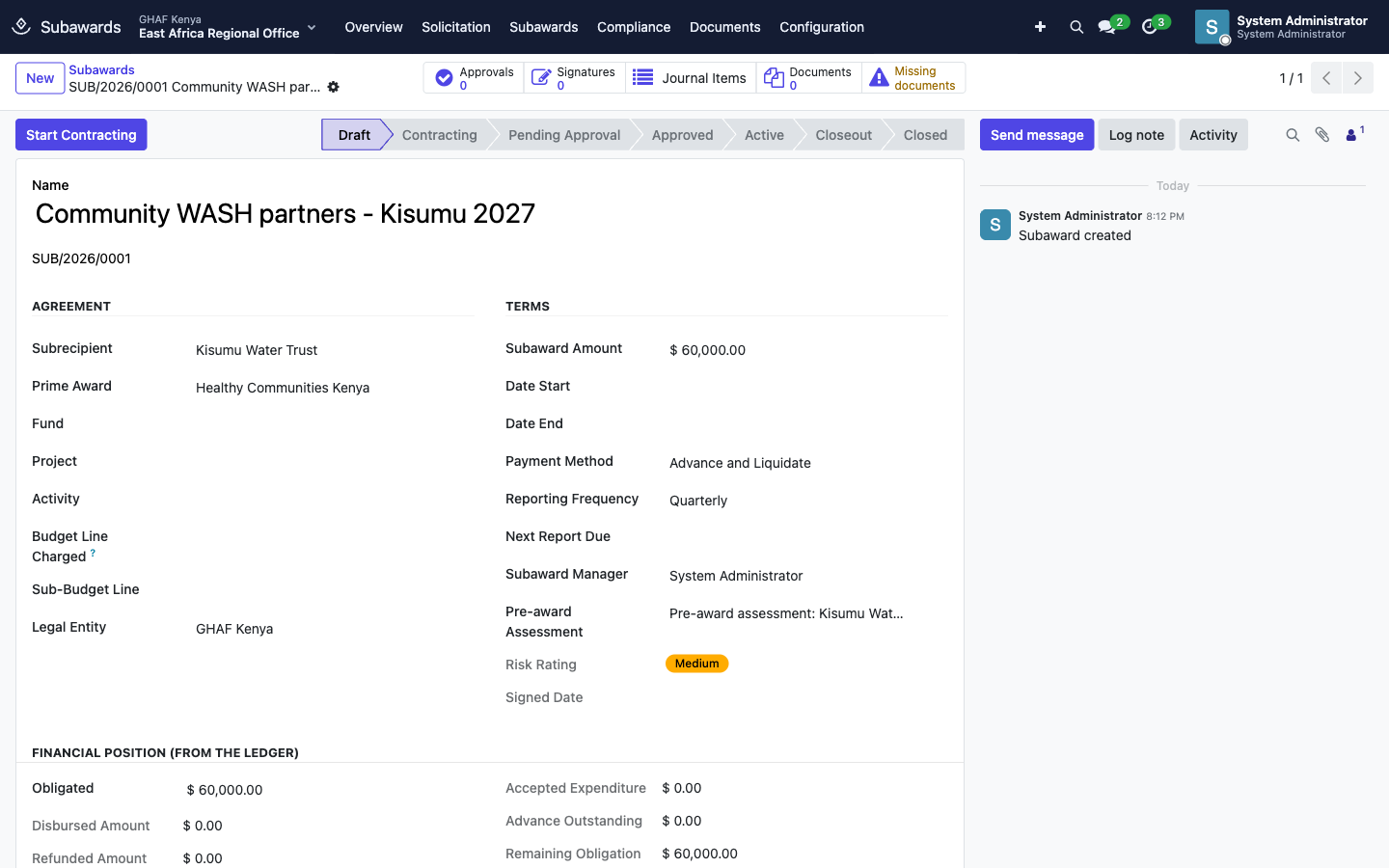
- Complete the Agreement and Terms sections:
- Fund.
- Project.
- Budget Line Charged: required. This is the prime award's budget line the money comes from.
- Date Start and Date End: required.
- Payment Method, e.g. Advance and Liquidate.
- Reporting Frequency.
- Click Start Contracting. The approved assessment must recommend proceeding.
- Click Generate Agreement for the agreement PDF. Then either attach the signed copy, or click Request E-Signature to have the subrecipient and your signatory sign digitally. Signatures shows the progress.
- Click Submit for Approval. The subaward goes to Approvals.
- Once it's approved, click Activate & Obligate. This needs the signed agreement and an active prime award. It obligates the subaward amount on the budget line, which you can see under Journal Items.
The Financial Position (from the ledger) section then tracks:
- Obligated, Disbursed and Refunded;
- Accepted Expenditure;
- Advance Outstanding;
- Remaining Obligation.
3. Pay the partner and account for the money
Disbursements (advances and payments)
- Under Subawards › Disbursements, or on the subaward's Disbursements tab, create the disbursement: an advance, a payment or a refund.
- Someone other than the preparer clicks Approve. Advances and payments are refused while conditions precedent are still open, or if they'd exceed what remains of the subaward.
- Finance chooses a bank or cash journal and clicks Post Payment. The journal entry is created at that point.
A paid disbursement can't be cancelled. Reverse its journal entry instead.
Partner financial reports (liquidation)
- Record the report: the period, the expenditure the partner reports, and the partner's report and supporting documents. Click Submit.
- A reviewer clicks Start Review.
- Someone other than the submitter either:
- clicks Approve & Liquidate: the accepted expenditure clears the partner's advance. Any amount not accepted (questioned costs) must be explained, and accepted spend can't exceed what remains of the subaward;
- or clicks Return to Partner with the reason.
4. Compliance
| Record | Steps |
|---|---|
| Conditions | Mark Met (attach evidence), Waive (record why), Breached, Reopen |
| Monitoring Visits | Plan the visit, then Visit Done (record the rating and findings), then Followed Up |
| Capacity Building | Start, then Mark Done (attach attendance, a policy or a report as evidence) |
| Partner Assets | Verified Today after a physical check; Record Disposition at the end |
A subaward shows as at risk when conditions are overdue, reports are late, or conditions precedent are still open while it's live.
5. Close the subaward
- Click Start Closeout. It works from active or suspended subawards.
- Clear everything Amana lists. Close Subaward names what's left:
- partner financial reports not yet approved, including the final one;
- an advance not yet accounted for (record the refund or further expenditure);
- approved disbursements not yet paid;
- partner assets without a disposition;
- conditions still open.
- Click Close Subaward. The chatter records what was disbursed and accepted.
To pause a subaward, click Suspend (a reason is required), then Resume.
Troubleshooting
\"Define the evaluation criteria before publishing the call.\" / \"The closing date has already passed.\"
Add criteria on Evaluation Criteria, and set a closing date in the future.
\"Score the application before shortlisting it.\"
Click Start Evaluation and enter scores on the Scoring tab.
\"Special conditions need at least one weak area (score 2 or less) to address.\"
Choose Proceed instead, or score the weak area 2 or less and describe the mitigation.
\"The assessor cannot approve their own assessment.\"
Another subaward manager must click Approve.
\"An approved pre-award assessment is required before contracting.\" or \"Set the start and end dates / budget line charged before contracting.\"
Approve the assessment first, then fill in Date Start, Date End and Budget Line Charged.
\"Attach the signed subaward agreement (or complete the e-signature) first.\" or \"The prime award … is not active.\"
Attach the signed agreement or finish the e-signature, and check that the prime award has been activated.
\"… conditions precedent on … are not met.\"
Open Conditions, attach the evidence, and click Mark Met for each condition precedent.
\"The person who prepared a disbursement cannot approve it.\" / \"The person who submitted a partner report cannot approve it.\"
Ask a colleague to approve. These steps always need two people.
\"Explain every amount not accepted (questioned costs).\"
Add the explanation for each disallowed amount on the report, then approve.
\"Resolve before closing: …\"
Work through the listed items, then click Close Subaward again.