Performance
Staff Admin
Performance runs staff appraisals: objectives agreed at the start of the year, a self-assessment and a manager's review at the end, a second look by the manager's own manager, and the employee's acknowledgement. It also opens probation reviews before a probation ends and end-of-contract reviews when a renewal decision is due, so those decisions rest on a recorded review.
Module: npo_performance
In plain words
- HR opens an appraisal cycle for a legal entity and period (for example Annual review 2026). Everyone with a contract in that period gets an appraisal.
- Each appraisal has a manager (the employee's manager) and a second-level reviewer (the manager's manager), taken from the organisation chart.
- It moves through fixed stages. At each stage, only the right person can change the right fields: the employee writes their own self-assessment, and only the manager rates.
- The score combines objectives (60% by default) and competencies (40%), each rated 1 to 5. A final rating of 2 or below means an improvement plan is needed.
- Probation reviews end with confirm, extend or end employment. End-of-contract reviews end with a renewal recommendation. The outcome goes onto the contract.
Before you start
- Every employee has a Manager, and managers have their own manager. That's how appraisals find the manager and second-level reviewer.
- The Appraisal Template fits your organisation: competencies, their behaviours and weights, and the objectives weight (Configuration › Appraisal Templates).
- Employees have contracts. A cycle only includes staff with a contract in its period.
Who uses it
| Role | What they do | Access level |
|---|---|---|
| Employee | Proposes objectives, self-assesses, acknowledges, in My Appraisals. | Any user |
| Manager | Agrees objectives, starts and writes the review, agrees the development plan, in Team Appraisals. | Any user (as manager) |
| Second-level reviewer | Confirms or changes the rating, or returns it to the manager. | Any user (as the manager's manager) |
| HR | Opens and closes cycles, follows All Appraisals, cancels appraisals. | Employees › Officer: Manage all employees |
| HR manager | Reopens appraisals, maintains templates. | Employees › Administrator |
The stages
Setting Objectives → Objectives Agreed → Self-Assessment → Manager Review → Second-Level Review → Employee Acknowledgement → Completed
| Stage | Who | What they do | Button |
|---|---|---|---|
| Setting Objectives | Employee and manager | Write the objectives: Objective, Success Measure, Weight (%), optionally the Project, Award and Target Date. Weights add up to 100%. | Agree Objectives (manager) |
| Objectives Agreed | Employee and manager | Update Progress (%) during the year. | Start Review (manager or HR) |
| Self-Assessment | Employee | Rate each objective and competency with evidence, and write the self-assessment. | Submit Self-Assessment |
| Manager Review | Manager | Rate each objective and competency, write the Manager's Summary, agree the Development Plan. | Submit Review |
| Second-Level Review | Reviewer | Confirm the rating, or set a Calibrated Rating with the reason. | Confirm Rating or Return to Manager |
| Employee Acknowledgement | Employee | Read the review, add comments, and tick Employee Disagrees if they do. | Acknowledge |
If an appraisal has no second-level reviewer, it goes straight from the manager to the employee.
1. Open the cycle
- Go to Cycles and click New.
- Enter the name, Legal Entity, type (Annual or Mid-year), Period Start, Period End, Deadline and Template. Optionally limit it to some Departments.
- Click Open Appraisals. Each manager gets an activity: Agree the objectives of ….
- At the end of the period, Start Reviews moves every appraisal with agreed objectives to self-assessment. Close Cycle closes it, noting any appraisals still open.
2. Agree objectives
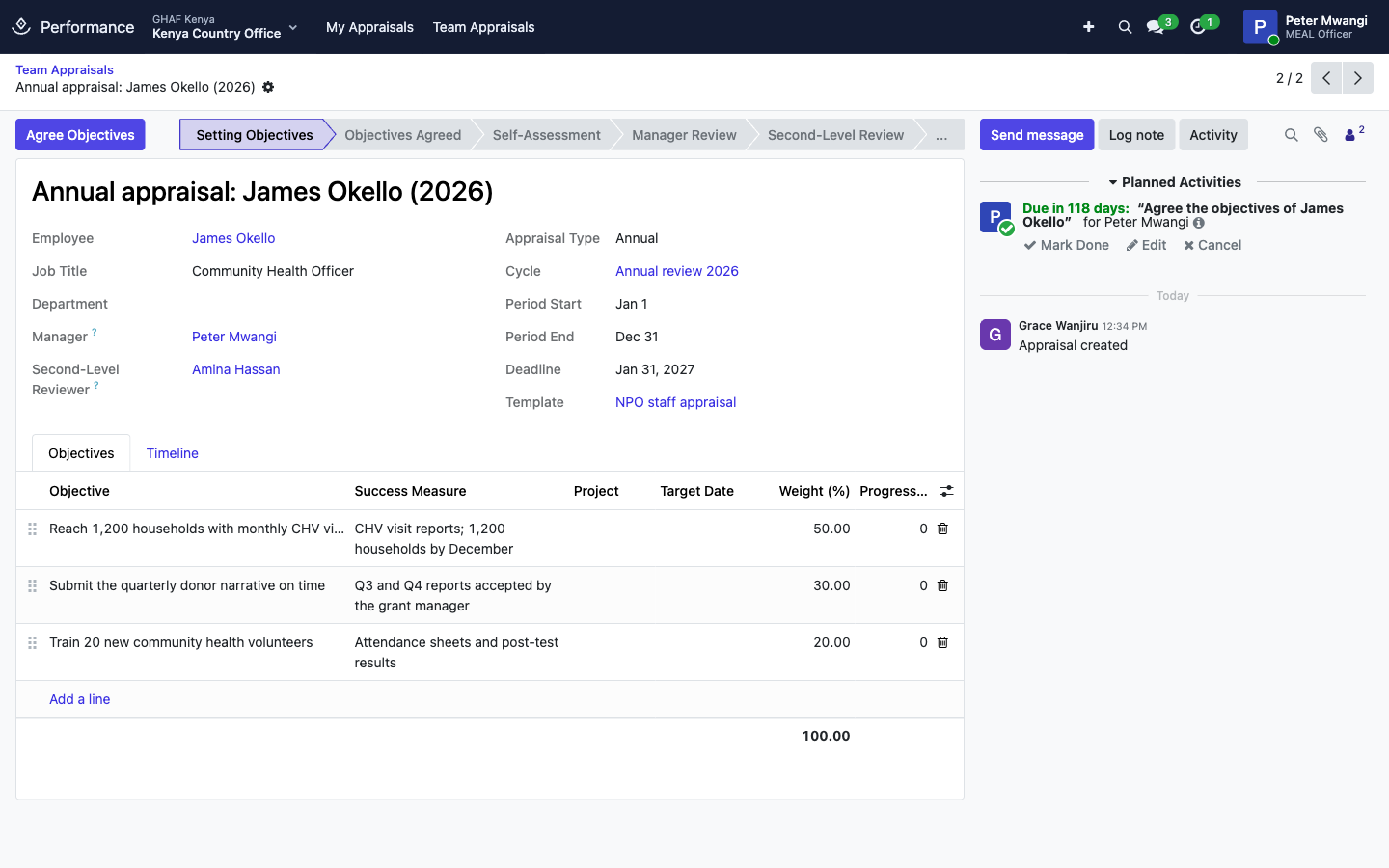
Link an objective to a Project or Award when it's about grant delivery, so it's clear which work the objective covers.
3. Review
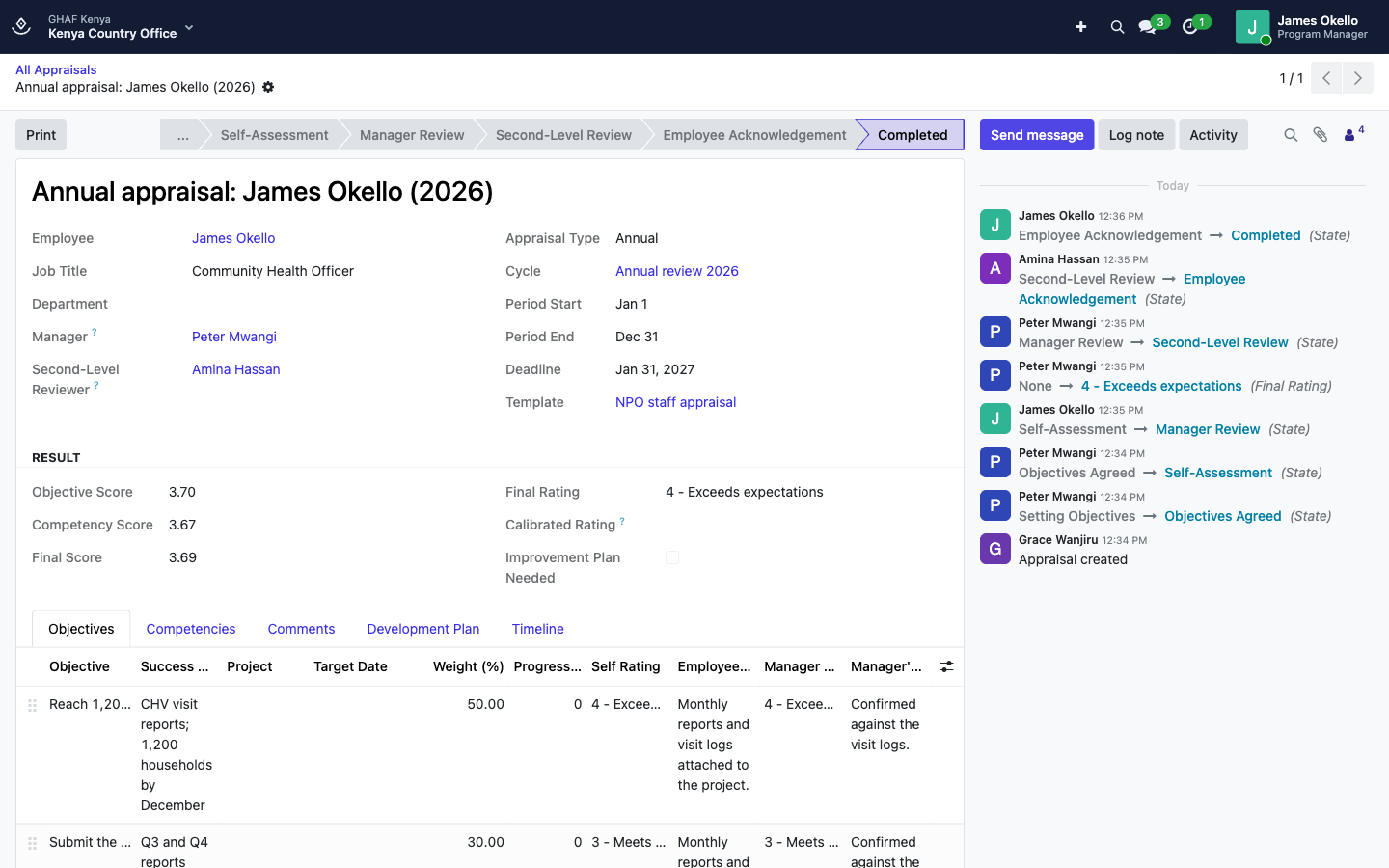
Ratings go from 1 - Unsatisfactory to 5 - Outstanding (3 is Meets expectations). The result is worked out as you rate:
- Objective Score: the weighted average of the manager's objective ratings.
- Competency Score: the weighted average of the manager's competency ratings.
- Final Score: objectives × the template's objectives weight + competencies × the rest. James: 3.70 × 60% + 3.67 × 40% = 3.69.
- Final Rating: the final score rounded to the nearest whole rating, unless the reviewer set a Calibrated Rating.
- Improvement Plan Needed: ticked when the final rating is 2 or below. The manager must then add an improvement step to the Development Plan before submitting.
4. Acknowledge
Acknowledging means the discussion happened, not that the employee agrees. If they tick Employee Disagrees, they say why, and HR gets an activity to follow up. HR is also told when an improvement plan is needed. Print gives the signed-off appraisal.
Probation and end-of-contract reviews
A daily job opens these from the contract:
- A probation review opens 21 days before the End of Probation. The manager records the probation outcome:
- Confirm in post: noted on the contract;
- Extend probation: give the new date, and the contract's end of probation moves;
- End employment: an exit clearance opens.
- An end-of-contract review opens when the contract's renewal decision is due. HR can also start one with End-of-Contract Review on the contract. The manager must Recommend renewal or Do not recommend renewal, and the recommendation and rating are noted on the contract.
Configuration
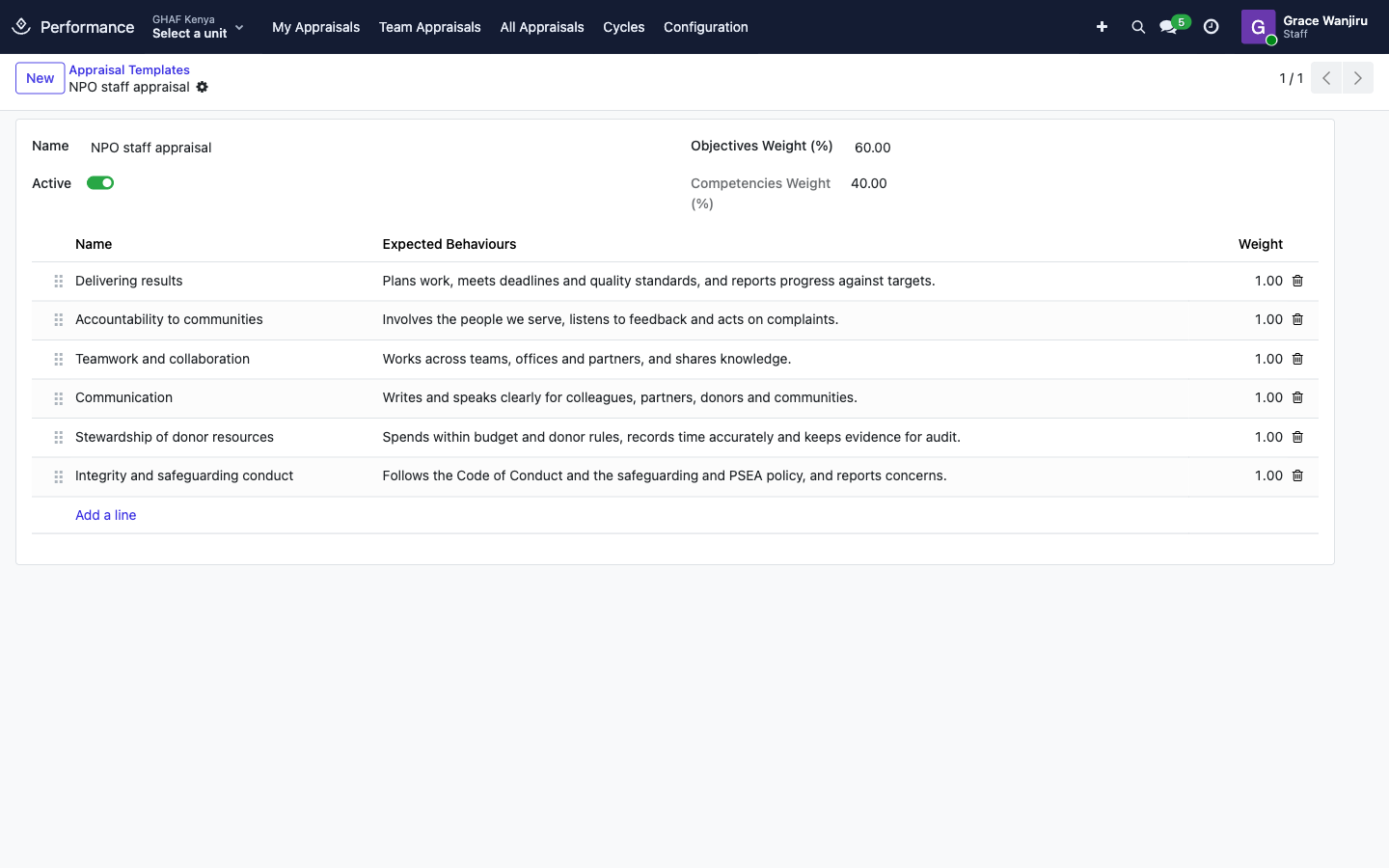
Configuration › Appraisal Templates holds the template: Objectives Weight (%) (60 by default; competencies get the rest) and the competencies with their Expected Behaviours and weights. The standard template, NPO staff appraisal, rates six competencies equally: Delivering results, Accountability to communities, Teamwork and collaboration, Communication, Stewardship of donor resources, and Integrity and safeguarding conduct.
Troubleshooting
\"The objective weights add up to …%, not 100%.\"
Adjust the Weight (%) of the objectives so they add up to 100.
\"… cannot be changed at the … stage by you.\"
Each stage has one person who can edit. For example, only the employee writes the self-assessment and only the manager rates. Wait for your stage.
\"Rate yourself on: ….\" / \"Rate: ….\"
Every objective and competency needs a rating before the stage can be submitted.
\"The rating is below expectations: agree an improvement plan in the development plan.\"
Add at least one step to the Development Plan (for example Improvement step, with the action and due date), then submit.
\"Explain why the rating is changed.\"
The reviewer sets a calibrated rating only with Reviewer's Comments explaining it.
An employee has no appraisal in the cycle
They had no contract in the cycle's period when it was opened. HR can create one in All Appraisals.
An appraisal has no manager or reviewer
The employee (or their manager) has no Manager on their employee record. HR sets it, then sets the Manager and Second-Level Reviewer on the appraisal.